
Change Claude Code's settings from ccdeck
To change a Claude Code setting from ccdeck, click Settings in the topbar, then Claude Code: each row writes one key to your ~/.claude/settings.json, and going back to Claude Code's default removes the key.
You will
- Change one of Claude Code’s own settings without opening its file
- Read why a row cannot be changed, or what outranks it
- Look up any other setting Claude Code documents
Before you start
- ccdeck 3.47.0 or later, open on the computer where Claude Code runs:
npx ccdeck. - Claude Code 2.1.101 or newer. The rows about your other sessions need 2.1.224, and the commit credit 2.1.281.
Steps
-
Open Settings › Claude Code
Click Settings in the topbar, or press Cmd + , (Ctrl + , on Windows and Linux), then click Claude Code.
Twelve rows sit in five groups: Your sessions, Memory and history, Git, Terminal and Updates. Each one changes one of Claude Code’s own settings, and says what it does under its name.
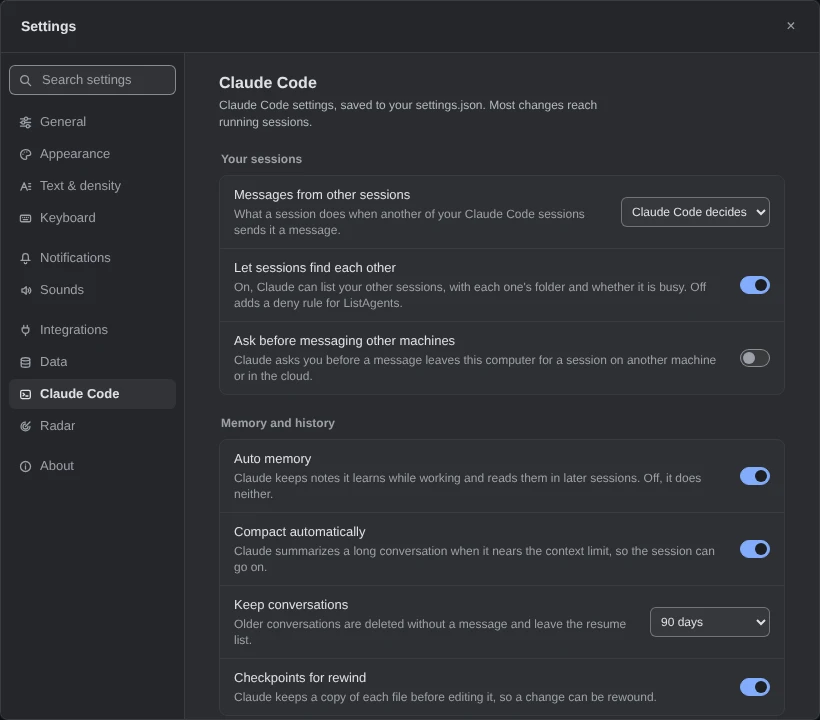 Open the full-size picture
Demo data Every row can be changed: the Claude Code here is new enough for all of them. This settings file was supplied to the page for this picture. -
Change a setting
Click a switch, or pick a value from a row’s list. ccdeck writes that one key to
~/.claude/settings.jsonstraight away, and most changes reach the sessions already running.Going back to Claude Code’s own default, such as 30 days under Keep conversations, removes the key instead. To undo a change, set the row back.
More about what it writes
- Only the key of the row you changed. Let sessions find each other adds or removes
ListAgentsinpermissions.deny, and leaves the rest of that list alone. - Before each change, ccdeck keeps the file as it was in
claude-settings.before-change.json, in its data folder, by default~/Library/Application Support/ccdeckon macOS,%LOCALAPPDATA%\ccdeck\Dataon Windows,~/.local/share/ccdeckon Linux. The next change replaces it. Like the file, it holds whatever yourenvblock holds, API keys included. - It never writes your organization’s settings, a project’s, or
~/.claude.json. WithCLAUDE_CONFIG_DIRset, it writes thesettings.jsonin that folder. - It reads the file again every ten seconds, so a change made elsewhere shows up.
npx ccdeck --uninstallleaves what you set here.
- Only the key of the row you changed. Let sessions find each other adds or removes
-
Read the line under a row
A row ccdeck will not change says why under it: your organization sets it, Claude Code is too old for it, or your file holds a value the row cannot show. A line under a row you can change names what outranks it, such as a variable in your file’s
envblock.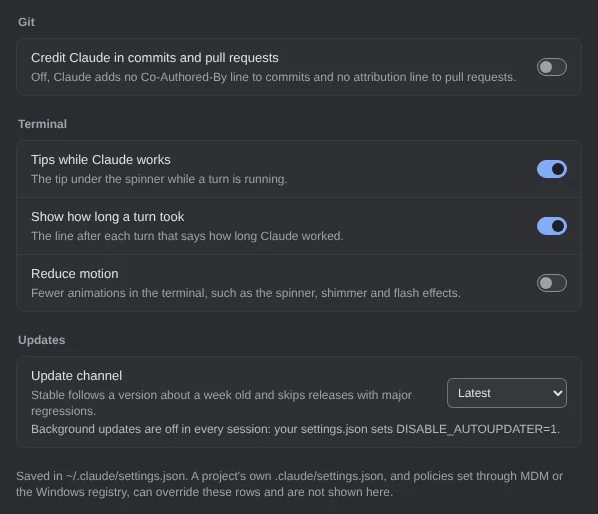
Demo data The channel can still be changed, but a variable keeps background updates off. This settings file was supplied to the page for this picture. Some overrides are not shown. A project’s own
.claude/settings.json, and policies set through MDM or the Windows registry, can override these rows in Claude Code without a line here. The line at the foot says so. -
Look up any other setting
Below the rows, All Claude Code settings lists the keys your
settings.jsonsets. An on or off value, a number or a choice shows as it is; anything else, such ashooks, shows only asset.Type into the filter to look up any of the 246 settings Claude Code documents, and click Reference to read one in Claude Code’s settings reference. This list changes nothing: edit those keys in the file.
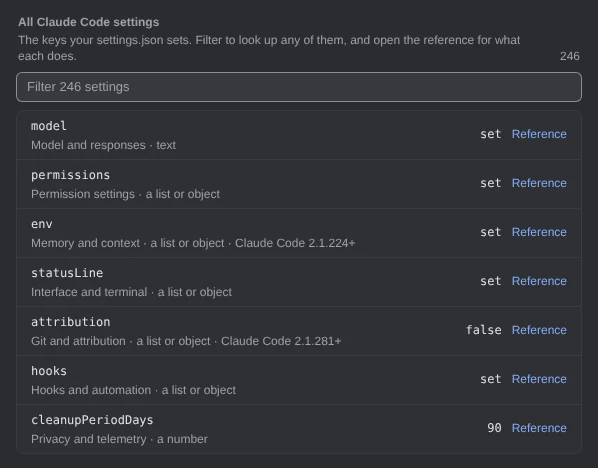
Demo data Blocks such as envandhooksnever reach the page, only that they are set. This settings file was supplied to the page for this picture.
If something goes wrong
Settings has no Claude Code section
ccdeck shows it only while it watches Claude Code. It found no Claude Code on this computer when it started, or it was started with --no-claude.
“Could not read Claude Code settings”
The section reads and writes only on the computer ccdeck runs on, not on a phone or another machine. On that computer, click Retry. If it says so again, check that ccdeck is still running.
A row says “Needs Claude Code 2.1.224 or newer”
Update Claude Code; the row follows within ten seconds. If it adds that the version could not be read, ccdeck cannot tell which Claude Code is installed, so it leaves that row alone. The others still work.
A row says “Changed back after saving”
Most likely a running Claude Code session wrote its own copy of the file over your change. Set the row again.
The rows are gone, and a line says your settings.json is not valid JSON
Claude Code skips that whole file, hooks included. Fix it in an editor. The section reads it again by itself and shows the rows once it can.
Something else? See Troubleshoot ccdeck: status, logs, port and hooks.