
Every agent.
One clear picture.
ccdeck is a free, open-source (AGPL-3.0) dashboard that runs on your machine and shows every Claude Code and OpenAI Codex CLI session, including ones started in a plain terminal: which Claude Code session needs input, each Claude Code subagent and every tool call as it runs, cost and quota left.
npx ccdeck --ref=home
macOS, Windows, Linux · Adds a one-way hook to ~/.claude/settings.json · What it touches
One task. A whole team of agents.
 ccdeck
v3.48.1
Demo data
ccdeck
v3.48.1
Demo data
- Shellterraform plan
- Editkeys.tf
- Shellterraform apply
-
livereviewer subagent Sonnet 515m 6 tools 1 in-flight
- Readlimit.ts
- Grep"429"
- Readlimit.test.tsrunning
-
donemigrator subagent Sonnet 51s 2 tools
-
donedocs subagent Sonnet 51s 2 tools
-
donegeneral-purpose subagent Sonnet 52s 3 tools
Select any node on the canvas. This panel is drawn for the page; in ccdeck, a double-click on a node opens the same facts in a side panel.
web-apilive
Prompt
Add rate limiting to the public API
Tool calls · 4
- ReadREADME.md0.4s
- GreprateLimit0.6s
- Readrouter.ts0.3s
- Agent4 subagents15m
Tokens
in 41.2kout 96.8kcache 1.84M
$4.28 so far · 24¢/min
reviewerlive
Task
Review the middleware
Recent tool calls
- Readsrc/mw/limit.ts0.4s
- Grep"429"0.6s
- Readtest/limit.test.tsrunning
Tokens
in 9.6kout 3.1kcache 212k
migratordone
Task
Move the counters to Redis
Tool calls · 2
- Editsrc/store.ts0.2s
- Bashnpm test -- store0.8s
Tokens
in 5.2kout 1.4kcache 88k
docsdone
Task
Document the new headers
Tool calls · 2
- Editdocs/limits.md0.3s
- Readdocs/api.md0.5s
Tokens
in 4.8kout 2.2kcache 61k
general-purposedone
Task
Find every unguarded route
Tool calls · 3
- Grep"app.get("0.4s
- Readsrc/routes/public.ts0.3s
- Bashrg -n 'router\.' src1.0s
Tokens
in 6.1kout 1.9kcache 74k
infradone
Prompt
Rotate the deploy keys
Tool calls · 3
- Shellterraform plan0.9s
- Editinfra/keys.tf0.2s
- Shellterraform apply2.0s
Tokens
in 8.9kout 14.6kcached 96k
49¢ total
Your terminal shows a scroll. ccdeck draws the tree.
One session becomes a team. ccdeck connects every agent to its work, so you can follow the whole story—from the first prompt to the last tool call.
The film’s lines, in order: Every terminal tab looks the same. One stopped to ask. You did not see it go by. Know which agent is waiting on you, and for how long. A session is a tree. ccdeck draws the tree. One canvas. No tabs. No kanban. It ends on the ccdeck logo, npx ccdeck, “Free, open source, runs on your machine.” and ccdeck.dev.
The same events. A clearer picture.
-
Claude Code and Codex on one canvas
Claude Code reports through a hook, and Codex is read from its own rollout log. The model chip on each node tells them apart.
-
It watches. It cannot steer.
The hook only forwards events. It exits 0 and writes nothing back, so it has no way to allow, deny or rewrite a tool call.
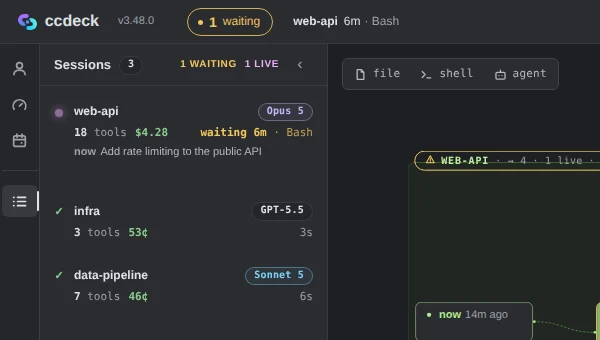
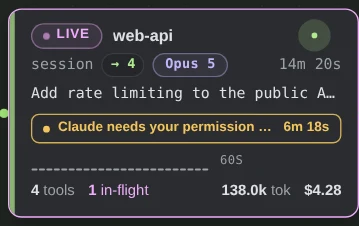
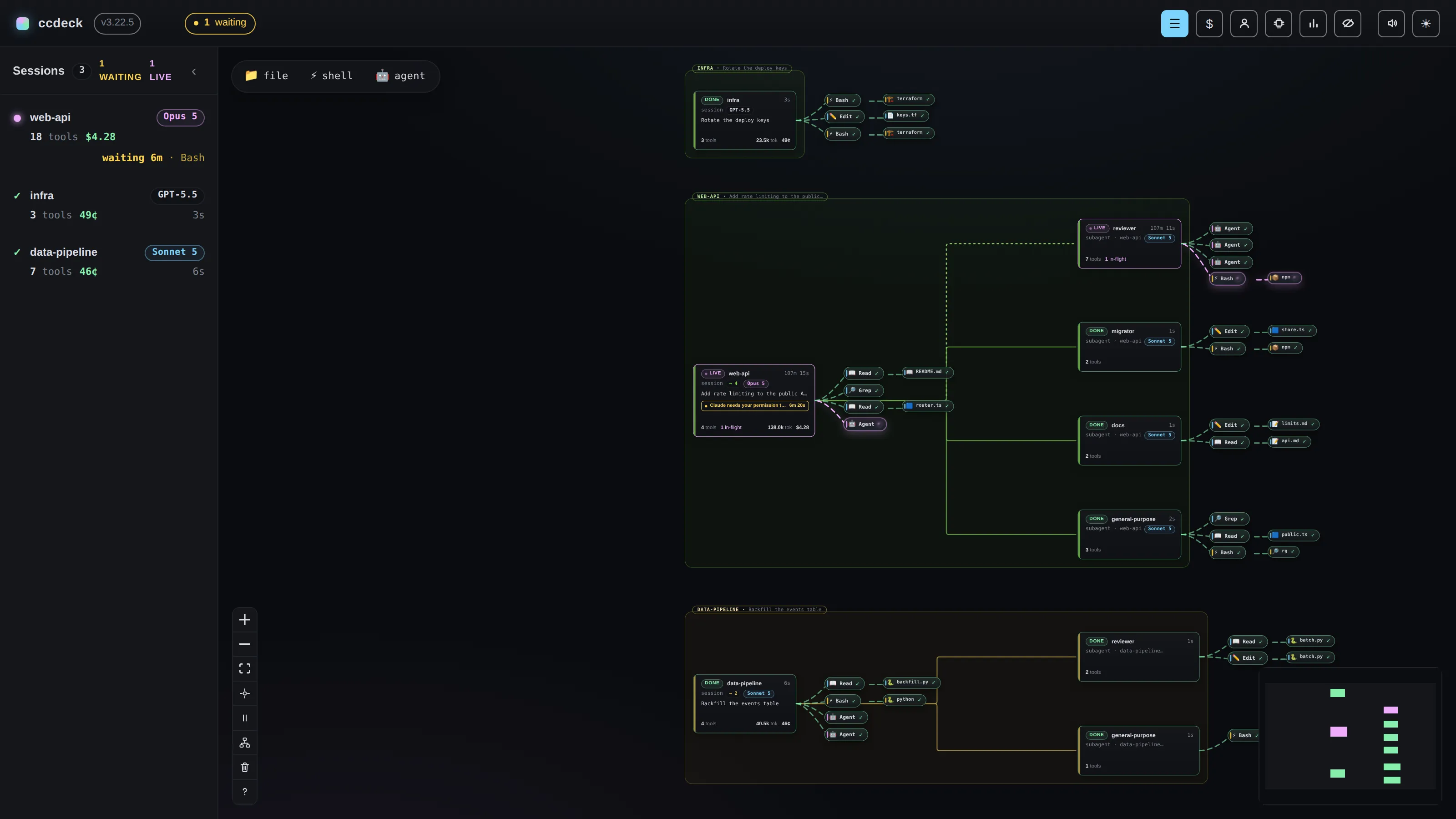
The next thing that needs you.
Already at the top.
A permission prompt, a question, or a finished turn waiting for your next instruction moves that session to the top of the list with how long it has waited. Prompts and questions sort above finished turns, longest wait first within each. Beside its count of prompts and questions, the topbar names those sessions, as many as fit, each with how long it has waited and on what (on a phone, the count alone), and the count jumps to the oldest. Once you turn on Notifications while closed in Settings, the deck raises a desktop notification when a session stops to ask.
Claude Code only. Codex is read from its rollout log, which records what happened rather than what is waiting now.
What each model costs, day by day.
Zoom out from a single session. See your daily usage, compare models, and find where the cost comes from.
Choose a day to see its model breakdown.
The film’s lines, in order: What is this costing? What each session costs, and how much quota is left. Claude and Codex quota windows, as they refill. Spend per model and per session. Usage history is read with ccusage. It ends on the ccdeck logo, npx ccdeck, “Cost and quota, live.” and ccdeck.dev.
Know your limits. Switch without the detour.
See usage and quotas for Claude Code and Codex at a glance. Keep multiple Claude accounts ready, then switch from the deck without another trip through the terminal.
Your Claude accounts
Demo: work account selected. Choose the other account to try switching.
npx ccdeck tui keeps them on one screen in the terminal. Auto-switch stays off until you turn it on, and every account keeps its own limits. When it moves Claude Code to another account, a notification says where to and why.Your available headroomQUOTA & PACE
ACTIVE CLAUDE ACCOUNT · work Max 5x
work@studio.example
15% under paceThe marker shows the pace to last until reset.
Last 4 weeks ended 74% used, 26% unused
Codex quota
The film’s lines, in order: Know your limits. Several Claude accounts: switch, add one. Auto-switch stays off until you turn it on. Switch accounts automatically when the active one nears its limit. Sessions already running are not restarted. Every account keeps its own limits. It ends on the ccdeck logo, npx ccdeck, “Switch without the detour.” and ccdeck.dev.
One working login.
Your machines, ready again.
Your desktop has a working Claude login. Your laptop should benefit from it. Pair your decks and choose which accounts to share: missing accounts can arrive automatically, and shared logins that stop working can repair themselves from a paired machine.
A little help from your other machine.
Desktop
Local network on · paired
work@studio.example
working · offered to paired decks
Laptop
Local network on · paired
work@studio.example
login stopped workingworking again · copied from Desktop
Mac mini
Local network off
not paired · nothing shared
The film’s lines, in order: Two or three machines. A claude login a week, on the machine you are not sitting at. They find each other and ask to pair. Nothing is shared until you tick it. An expired login is copied back within a minute. Your machines repair each other’s expired logins. It ends on the ccdeck logo, npx ccdeck, “Logins that repair each other.” and ccdeck.dev.
Scope. A login ticked on one deck arrives on every deck paired with it, unless that deck is using it: added where it is missing, repaired where it has expired, and never in place of one that still works. This shares accounts, not agent sessions or remote control. On a VPN, a guest network or a second subnet, add a deck by address or with an invite. A live login crosses the network, so pairing is the decision that matters.
Pair your machines
Local network is on by default, in Claude accounts. As shipped, there is nothing to click: Say yes to every deck that asks starts on, so your own machines pair without a press. On a network you do not own, turn it off.
Share the accounts you choose
Sign in on one machine and tick the accounts it may share. Paired decks can add those accounts without pasting a login blob.
Let it repair
Once a minute, paired decks check for missing accounts and broken shared logins. A working copy can repair a dead login; an account that still works stays untouched.
More about local network
-
Every deck on one map
The map button on the Local network row draws this deck at the centre with the paired decks that are on around it, the ones that are away further out with how long they have been gone, and machines that are not paired in grey. Point at a deck to see whether it is there, how it is reached and which logins the two share.
-
Your machines on Tailscale, too
A tailnet carries no broadcast, so the deck cannot hear your other machines there on its own. Where Tailscale is installed, turn on Look for my devices and the deck asks only the machines signed in to your own Tailscale account, wherever they are. It starts off.
Over SSH, in the terminal.
Or in your own browser.
On a machine you reach over SSH, there is no browser to open the deck in. npx ccdeck tui keeps its Claude accounts and the Claude Code sessions waiting on you on one screen, and npx ccdeck open prints the one ssh line that brings the whole deck to your own browser.
A terminal reached over SSH, showing the ccdeck tui screen. Accounts: work, in use, at 42% of its 5-hour window and 61% of its 7-day window; home, Auto-switch’s home account, at 3% and 12%; side@lab.example, which needs a sign-in. Auto-switch is off. Waiting on you: docs-site, on Sonnet 5, asks “Keep the old URLs as redirects?”, and web-api, on Opus 5, has waited 6 minutes for permission to use Bash; one more session is working. The keys along the bottom: the arrows move, Enter switches, b selects the best account, a turns Auto-switch on or off, + adds an account, r reads the usage again, ? lists the keys and q quits.
-
Switch from the keyboard
Press Enter to switch to the selected account; the sessions already running follow from their next message. b selects the account Auto-switch would pick, and a turns it on or off.
-
Sign in from any browser
+ adds an account, and Enter on an expired one signs it in again: open the link it shows in any browser, then paste back the code. The account in use stays active. Sign-in goes through the deck; with none running, d starts one.
-
The whole deck, through SSH
Where a deck runs,
npx ccdeck openprints anssh -Lline to run on your own computer, and the deck opens at127.0.0.1:14317in your browser: not 4317, so it never lands on a deck of your own. On that machine it still listens only on127.0.0.1.
What it touches.
ccdeck is local, but it is not read-only. This is the short version; the README has the long one.
Stays on your machine
Your sessions, prompts and tool calls: what they contain is never sent. The usage reports carry rough counts, such as how many sessions ran in a day. What Telemetry Radar captures, which can include prompts Claude Code sends to a telemetry collector, is kept in the deck’s memory for up to a day and sent nowhere. The dashboard listens on 127.0.0.1; Local network is on by default and also listens on your network; you can switch it off. Account transfer requires pairing and selected shared accounts.
Written on your machine
The hook entry in ~/.claude/settings.json, and in the same file only what you change there from the deck: a Telemetry Radar flag in its env, set to 1 or 0, or a Settings › Claude Code row’s key alone, such as a ListAgents rule in permissions.deny, with the file as it was kept first in claude-settings.before-change.json beside prefs.json. The deck’s event log, its settings in prefs.json, which hold this deck’s Local network private key, the quota readings of the last 35 days in quota-history.json, how full each quota window was at its reset, for up to 400 days, in quota-closes.json, and the collectors Telemetry Radar found, which it monitors by itself, in ~/.agents-deck/. For Tool activity, a record of every tool call your agents make while the deck runs, in a tool-audit folder beside prefs.json: the tool or command, such as git status, when it ran, how long it took and whether it failed, never its arguments or output, and for Skill activity each skill they use, with the session it ran in and its project folder’s name, kept for 90 days unless you choose 30 or 60 in Settings, where you can also clear it. The helpers it manages (claude-swap, ccusage, a uv binary if it has to fetch one, and macmon on an Apple Silicon Mac whose sensors are silent), Codex’s token in ~/.codex/auth.json, refreshed the way Codex refreshes it, and Browser Watch’s local findings and log. And once you type your password at Telemetry Radar’s Allow capture…, the system: on macOS a startup helper of ccdeck’s (a LaunchDaemon) that lets an access_bpf group, which you join, read the capture devices; on Linux tcpdump, installed by your package manager if it is missing, given the right to capture and limited to your own group.
Leaves your machine
A small version check to npm, installs and checks for those helpers, quota reads to Anthropic and OpenAI signed with your own credentials while the page is open or a quota notification is on, and at most once in the 45 minutes before each weekly reset, to record how full the week ended, unsigned reads of their status pages about every three minutes while the page is open or the desktop app has a session running or waiting, and on Apple Silicon Macs whose sensors are silent, a one-time download of macmon. The desktop app also checks GitHub for its own updates, and installs one only if it carries ccdeck’s signature. Opening Radio asks the public Radio Browser directory for stations, sending your search text and filters; a station you play from it is reported to its popularity count and plays straight from the broadcaster, or from YouTube for the video streams, each of which sees your IP address. AGENTS_DECK_NO_MUSIC=1 turns Radio off. Jira, GitHub and GitLab, if you connect them in Settings, get requests from your machine, signed with your own token: when you connect or test one there, and while its panel is open. They only read, except that Jira saves a move between sprints and the backlog, or a new order, when you drag an issue or confirm Move. On Linux, Allow capture… also has your package manager download tcpdump when it is missing. Unless it is started with AGENTS_DECK_NO_REPORTS=1, the deck also sends usage reports to api.ccdeck.dev. In short, they carry its version and your system, a device fingerprint, your Claude and Codex plan (such as Max 5x or Plus), rough counts and ranges such as how many sessions ran in a day, your 0–10 rating of ccdeck if you give one, the ccdeck.dev page an install command names with --ref, and the errors it runs into, with folders, addresses and keys scrubbed out; the README lists every field. While the deck runs it also sends a tiny heartbeat every few minutes, the install id and nothing else, and the topbar’s Feedback button sends what you write, and any screenshots you add, to the same place, with the version, your system and the same device fingerprint, which AGENTS_DECK_NO_REPORTS=1 leaves out here too. Those reports carry your IP address, and every visit to ccdeck.dev itself records your IP address, a browser fingerprint and how long each page is read, to understand who uses ccdeck. What your sessions, prompts and files contain stays on your machine.
What Browser Watch reads.
Browser Watch starts enabled. It checks supported Chromium browsers for visits made after the deck started, looking for pages a program loaded while nobody was browsing: the visits Chromium marks FROM_API, as it marks a page loaded with its debugging protocol’s Page.navigate or an extension’s tabs.update. It misses what leaves no mark: a link a program clicks, a tab it opens straight at an address, and an address handed over by open or xdg-open. It temporarily copies history databases to query them, then deletes the copies. Findings stay on your machine.
Turn the watch off to stop background checks. Opening its panel still reads live. Existing visits from before the deck started are not included.
The film’s lines, in order: Did something drive your browser while you were away? An agent with browser control opens pages through an API. Chromium records that: FROM_API, not LINK or TYPED. The panel behind the eye icon answers one question. The pages a program opened while nobody was browsing. It is usually your own agent working in the browser. None of what it reads leaves the machine. It ends on the ccdeck logo, npx ccdeck, “Detect browser automation while you were away.” and ccdeck.dev.
FROM_API: a link it clicks or a tab it opens straight at an address is not. Drawn as a reconstruction of the deck.Keep it in your menu bar.
The desktop app is the same deck with no Node.js to install. It opens in its own window, with the deck’s topbar as its title bar beside the system’s own window buttons, and a dot appears on its icon when a Claude Code session stops on a permission prompt or a question, with the count beside it on macOS. Turn on Notifications while closed, and with the window shut a finished turn arrives as a notification. It also shows the account notifications, silently and whether its window is open or closed. It updates itself.
Free, and the same deck npx ccdeck runs. Every system’s installer, and what its first launch asks, is below.
ccdecknow
web-api
Tests pass. The migration is ready for review.
Installers, and what the first launch asks
macOS
Not notarised by Apple yet, so the first launch asks once: System Settings, Privacy & Security, Open Anyway. Installing from a terminal skips that step.
curl -fsSL https://
Windows
Installs for your user, with no admin prompt. It is not signed yet, so SmartScreen asks once: More info, then Run anyway.
Linux
For x86-64. On Debian and Ubuntu take the .deb — it installs with a double click. The AppImage is the one file for every other distribution, and a browser saves it without the permission to run, so it does nothing at all until you give it one back: chmod +x ccdeck-linux-x86_64.AppImage. The icon also needs a tray to sit in: KDE and waybar have one, and GNOME needs the AppIndicator extension. The .deb recommends tcpdump, which Telemetry Radar captures with, so apt installs it too.
Start in one command.
-
Have Node.js 18 or newer
And Claude Code, Codex, or both, on macOS, Linux or Windows.
-
Run ccdeck
npx ccdeck --ref=homeIt opens
http://127.0.0.1:4317and, on the first run, adds its hook to~/.claude/settings.json. If that port is busy, the terminal prints the one it took. -
Start an agent
Run
claudeorcodexin any folder. The session appears on the canvas by itself.
ccdeck keeps running after you close the terminal. npx ccdeck --stop turns it off, and npx ccdeck --uninstall removes its hooks and login item and stops every deck still running; its own folders stay until you delete them, and --purge deletes the files that hold this deck’s Local network private key. A Telemetry Radar flag you flipped and a Settings › Claude Code row you changed stay in ~/.claude/settings.json, and what Allow capture… changed in the system stays until you undo it as the README shows.
Questions
Does it work with Codex, or only Claude Code?
Both, on one canvas, with spend and quota for each. Three things are Claude Code only: subagent cards, the waiting-on-you queue, and account management, which includes Local network. The guide Set up ccdeck for Codex CLI shows what the deck reads from Codex and what it cannot see.
How does it know a Claude Code session is waiting for me?
Claude Code says so through its Notification event: when it needs your approval for a tool call, when it asks you a question, and when a finished turn has gone about a minute without you typing. The deck’s hook forwards that event, and the session moves to the top of the list. This is Claude Code only; the Codex rollout log records what happened, not what is waiting now. How to tell when Claude Code is waiting for input compares this with Agent View and a notification of your own.
How is it different from Agent View?
Agent View, claude agents, is Claude Code’s own list of the sessions you run in the background, and you can reply from it. ccdeck shows the Claude Code sessions from every terminal, backgrounded or not, each Claude Code subagent as its own card, and Codex CLI sessions, with cost and quota. It cannot reply: you answer in the terminal. Agent View and ccdeck puts the two side by side.
Can it approve my agent’s tool calls?
No. The hook forwards events and has no way to answer: it exits 0 and writes nothing to stdout, the two channels Claude Code gives a hook to allow, deny or rewrite a tool call. The deck never edits your code. Browser Watch has separate, configurable reactions to detected browser activity.
What does it add to ~/.claude/settings.json?
One hook entry for each of up to twelve Claude Code events, marked __agent-dag, that runs a small forwarder the deck copies into ~/.claude/agent-dag/. Ten are always there. StopFailure is added when every Claude Code the deck finds is 2.1.78 or newer, and UserPromptExpansion, which lets Skill activity count the slash commands you type, when every one is 2.1.116 or newer, unless you start the deck with AGENTS_DECK_SKILL_HOOK=0. The forwarder passes the event to the deck and exits 0. Hooks of your own stay where they are, even in the same group, and npx ccdeck --uninstall takes out only the deck’s entries. Two parts of the deck change the file only when you do: Telemetry Radar, when you flip one of its flags, such as CLAUDE_CODE_ENABLE_TELEMETRY or OTEL_LOG_USER_PROMPTS, set to 1 or 0 under env for new sessions; and Settings › Claude Code, when you change one of its twelve rows, which writes that row’s key alone, removes it when you go back to Claude Code’s default, and first keeps the file as it was in claude-settings.before-change.json. --uninstall leaves both. With $CLAUDE_CONFIG_DIR set, all of this goes there instead. The uninstall guide shows how to take it out.
Do I have to keep a terminal open?
No. It runs in the background and survives the terminal closing. A global npm install also starts it when you log in; an npx run does not. npx ccdeck --stop ends it. The desktop app needs no terminal at all: it uses the deck that is running or starts its own, and Quit in its menu stops only a deck the app started. The first-run guide shows how to start it, stop it and keep it running across a reboot.
Does it work over SSH?
Yes, as Over SSH above shows. On the machine you reached, npx ccdeck tui keeps the Claude accounts and the Claude Code sessions waiting on you on one terminal screen: switch accounts, turn Auto-switch on or off, and sign an account in with a link opened in any browser. For the whole deck, npx ccdeck open prints an ssh -L line to run on your own computer, and the deck opens at http://127.0.0.1:14317 in your browser; on that machine it still listens only on 127.0.0.1. Use ccdeck from a terminal or over SSH walks through both.
Is an account share safe to paste?
Treat it like a password. A share carries the account’s live login unencrypted, and it expires ten minutes after it is made.
Is Local network remote access?
No. It adds missing shared Claude accounts and repairs broken shared logins between paired decks. It does not share agent sessions, project files, or control of another machine. The Local network guide shows how to pair two machines and choose which logins they share.
Does it show anything about the machine itself?
Yes, beside the work: per-core CPU, memory and swap, and a Thermal section only where the machine actually answers. On Windows, a thermal zone is drawn only once its value has changed, and is never called CPU. Open a reading for its history, or for the processes behind it. On Linux and Windows with NVIDIA’s nvidia-smi, it also shows each NVIDIA GPU’s utilization, video memory, temperature and power, with no history kept. The deck’s usage reports carry the number of cores, the total memory, the deck’s own peak memory as a range and a device fingerprint, but none of the panel’s readings or their history.
Can it show which tools are slow or keep failing?
Yes. Tool activity, on the stripe on the right below Usage history (under More on a phone), counts the tool calls your Claude Code and Codex sessions made in the last 24 hours, 7, 30 or 90 days: how often each tool or command ran, such as git status or npm run build, how long it usually takes, and how often it failed. Where the time went splits your Claude Code turns between Claude, this machine and you. It counts the calls made while the deck runs, and reads no earlier sessions. The record stays on your machine, without any call’s arguments or output, for 90 days unless you choose 30 or 60 in Settings, where you can also clear it.
Can it show my Jira board or GitLab merge requests?
Yes. Connect Jira Cloud or Server, GitHub or GitLab in Settings, Integrations, with a token of your own, and each gets a button on the left edge: a Jira board with its sprints, or a project’s branches, merge requests, pipelines and issues, beside your agents. The deck reads from your machine while the panel is open. GitHub and GitLab are only read: it never comments, approves or merges. On a Jira Scrum board ordered by Rank you can drag issues, or press Move, to reorder them or send up to 50 to another sprint or the backlog, which Jira saves with your own permissions; browsing writes nothing. The token stays on your machine. The guides Connect Jira, read your board and move issues and Connect GitHub or GitLab to ccdeck show how.
Is ccdeck free?
Yes. The deck and the desktop app are free and open source, under AGPL-3.0. It needs no account, API key or config file of its own; the quota panels read your Claude and Codex limits with the logins you already have.
Does it run on Windows?
Yes, and on macOS and Linux; each release is tested on all three. npx ccdeck needs Node.js 18 or newer. The Windows desktop app installs for your user with no admin prompt. It is not signed yet, so SmartScreen asks once. The desktop app guide walks through each system’s installer.
What license is it under?
AGPL-3.0-only, since version 3.22.0. Releases up to 3.21.4 were MIT, and those grants stand. Running it on your own machine asks nothing of you. The licensing details are in LICENSING.md in the repository.
Is ccdeck the same as Claude Deck, cc-deck or agent-deck?
No. This ccdeck is the npm package ccdeck by Bargan Constantin, with its source at github.com/BarganConstantin/ccdeck. Claude Deck, cc-deck, agent-deck and the other repositories named ccdeck are separate projects by other people. ccdeck watches sessions through a Claude Code hook and the Codex rollout log; it does not start new sessions, use tmux or run an MCP server. Its earlier npm names, agents-deck and agent-dag, are retired.
See your agents in one place.
npx ccdeck --ref=home