Fix the common problems
Which deck is running and what it last wrote, and the fix for each message ccdeck prints when a session, the port or a setting goes wrong.
Before you start
- ccdeck 3.31.0, run with
npx ccdeck, installed withnpm i -g ccdeck, or running inside the desktop app. - A terminal on the same machine, with the same
CLAUDE_CONFIG_DIR,CCDECK_HOMEandCODEX_HOMEas the deck, if you set any of them. With other values,--statuscan miss the deck, and a plainnpx ccdeckstarts another one or replaces it. - The commands are written for an npx run. With ccdeck installed globally, leave out
npx. A few lines the deck prints leave it out too, such as`ccdeck` starts one; after an npx run, type them withnpx.
Steps
-
Check which deck is running
npx ccdeck --statusEach running deck gets three lines: its version, pid and uptime; its address; then the folder it watches, or
(all)for the whole machine, and its event log. The deck a plainnpx ccdeckwould open is marked`ccdeck` opens this one.no deck is running — `ccdeck` starts onemeans nothing is running for this config folder. Runnpx ccdeck. -
Read what the deck last wrote
npx ccdeck --logsThe deck runs in the background, so what it would have printed goes to
deck.log. This prints the last 200 lines, then the file’s path and size.nothing logged yetmeans no deck has written a log in that folder.The folder is
~/Library/Logs/ccdeckon macOS,%LOCALAPPDATA%\ccdeck\Logon Windows, and$XDG_STATE_HOME/ccdeckor~/.local/state/ccdeckon Linux.CCDECK_HOMEmoves it; withCLAUDE_CONFIG_DIRset, it is theagent-dagfolder inside that one. Three lines worth looking for:not registered, withClaude Code hooks find this deck through <file>, so until that file exists no Claude Code events arrive.The deck puts the file back by itself and saysregistered again.the deck has stopped 5 times in 10 minutes: see step 6.settings were not saved:see step 7.
The desktop app’s own deck writes to
deck-app.login the app’s logs folder instead, and--logsdoes not read that file. -
Check whether the deck watches one folder only
A deck started with
--workspaceand a path, or with--scope(the folder it was started in), draws only sessions whose folder is that one or inside it, for Claude Code and Codex alike. Its empty canvas names the folder.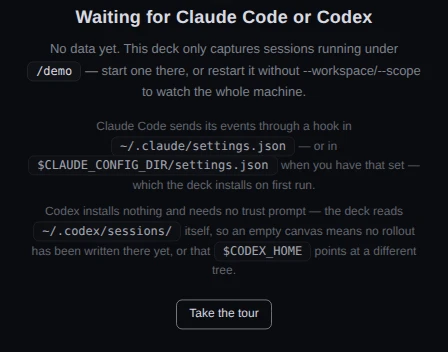
Demo data A deck started with --workspace /demo, before any session under/demohas run.The first row of the start-up report says the same,
workspaceand then the folder or(all), and so does the third line of--status. To watch the whole machine, start the deck with no flags:npx ccdeckA start with other settings stops the running deck and takes its place:
stopped the deck on <port> · pid <n> · it was started with different settings. If the report saysmissing value --workspace — expected a path; using the default, the flag had no path after it, and the deck watches the whole machine.Show only one project's sessions has the rest, such as what the folder does not narrow.
-
Check that the deck watches Claude Code and Codex
The start-up report has a row for each.
Claude hookswith a path: the hook is written, asagent-dag/hook.jsin the Claude config folder the deck used.Claude hooks skipped — no Claude Code found, or --no-claude: the deck is not watching Claude Code, and its empty canvas saysClaude Code capture is off. Start it withnpx ccdeck --claude.Claude hooks not installed, and the deck stops. It will not rewrite a Claude Codesettings.jsonit cannot read. The line under it names the file and endsRefusing to overwrite it — fix the file or move it aside, then run ccdeck again.Do that, or runnpx ccdeck --no-claudeto start without Claude Code.Codex sessions watchingwith a folder: the folder the deck reads Codex’s rollout files from.Codex sessions skipped — no ~/.codex/, or --no-codex: setCODEX_HOMEto the folder Codex uses, or start withnpx ccdeck --codex.
Claude Code only. The deck writes its hook into the
settings.jsonof theCLAUDE_CONFIG_DIRit was started with, and a Claude Code session looks for decks through its ownCLAUDE_CONFIG_DIR. A deck and a session started with different values never meet. Start the deck from a shell with the same value as your sessions; the path in theClaude hooksrow shows the one it used.A session that was already running when the deck started appears the next time it does something, with ? beside its name. Read a session on the canvas says why.
Use ccdeck with Codex says what the deck reads from Codex and what it cannot see.
-
Check the address the deck is on
The deck asks for port 4317, or the one given with
--portorAGENT_DAG_PORT. It moves only when something that is not one of your decks holds that port, and then tries up to ten random ports from 4318 to 4400. The address to use is on theserver readyrow, or in--status. A browser keeps the tour and your panel choices per address, so they start over on a new one.A tab where no deck answers says so: Lost connection to the ccdeck server. Reconnecting… in a banner once it had connected, Server unreachable or Disconnected from server on an empty canvas, and offline in the topbar’s pill. The page says to check your terminal, but the deck runs in the background: run
npx ccdeck. It opens the running deck’s tab, withdeck already running, or starts one. A tab at the right address reconnects by itself.If no port can be had, the start fails with
ccdeck: server failed: all ports tried — none availableand the last error. On Windows, a reserved port range is the usual cause: the message namesnetsh interface ipv4 show excludedportrange protocol=tcp, and a--portoutside every range it lists gets past it. -
Check that the deck comes back after a reboot
A deck run with
npx ccdecknever starts at login: a login item would point into npm’s cache, which npm deletes without warning. Runnpx ccdeckagain after a reboot, or run this once:npx ccdeck --installIt installs ccdeck globally with npm and adds the login item, and says
ccdeck is on your PATH, thenand starts when you log in.npx ccdeck --install-servicerefuses withan npx run cannot start at login.A global install adds the login item by itself on its first run, once per machine, and says
ccdeck will now start when you log in. Afterccdeck --uninstall-serviceit is not added again by itself;ccdeck --install-serviceputs it back. No login item is added whileAGENTS_DECK_NO_INSTALL=1is set, and the deck inside the desktop app adds none: the app has its own Start at login.Linux only. systemd ends a user’s services at logout unless lingering is on.
--installand--install-servicethen saysystemd tears your session down at logout, so the deck goes with it.and printsudo loginctl enable-linger $USER, which they do not run for you.A deck that crashes starts again, up to five times in ten minutes. After that the log says
the deck has stopped 5 times in 10 minutes — not starting it again.Read it withnpx ccdeck --logs, then runnpx ccdeck. A deck that failed to start in the first place is not retried. -
Check the settings file when a change will not save
The deck keeps its own settings in
prefs.json, not in Claude Code’ssettings.json. Its folder is~/Library/Application Support/ccdeckon macOS,%LOCALAPPDATA%\ccdeck\Dataon Windows, and$XDG_DATA_HOME/ccdeckor~/.local/share/ccdeckon Linux;CCDECK_HOMEandCLAUDE_CONFIG_DIRmove it as they move the log.When a save is refused, a red line in the Claude accounts panel’s Local network view, or in its This deck on the network dialog, says what failed and why. For example:
Could not turn this on — this deck cannot open its settings folder, which belongs to another user, for example after ccdeck was run with sudo. The deck's log has the command that gives it back. Error code: EACCES.A run of ccdeck with sudo is the usual cause.- macOS, a folder that belongs to another user. The line has a give it back button. It opens macOS’s password dialog, gives the deck’s folders back to you and reads the settings again, without a restart:
Done — the settings folder is yours again, and the deck has read it again. Try that once more. - Everywhere else.
npx ccdeck --logsnames the file or folder. For a folder that belongs to another user it also prints the command that gives it back:sudo chown -R "$(id -un)" "<folder>". - A damaged file. Fix it or move it aside, then run
npx ccdeck --stopandnpx ccdeck. The file holds this deck’s Local network key and pairings, so keep any copy the deck set aside.
Only that view and its dialog show the line. Other switches that save to the same file, such as Notifications while closed in the Sound menu, say nothing when a save is refused.
Let your machines repair each other's Claude logins goes through the reasons the line gives, under If something goes wrong.
- macOS, a folder that belongs to another user. The line has a give it back button. It opens macOS’s password dialog, gives the deck’s folders back to you and reads the settings again, without a restart:
-
Check which deck the desktop app is using
When the app opens, it uses the deck that is already running, whether it came from
npx ccdeck, a login item or the app, 4317 first. It replaces that deck only when it is older than the deck the app carries, and it does not look at the folder that deck watches: a deck scoped to one folder is what the app shows. The version row of its menu names both versions when they differ, as in ccdeck v3.30.0 · deck v3.31.0: an app at 3.30.0 using a newer deck.Quit ccdeck stops only a deck the app started.
npx ccdeck --stopstops every deck, the app’s too; the menu then reads No deck running, and the app starts one again only when you click Start the deck. If an npm login item would also start a deck, the app asks once, Another ccdeck starts when you log in, with Replace it with the app and Keep it.Install the desktop app has the rest.
-
Check the quota and cost readings
Press U to open Usage. A quota the deck could not read says so, and why.
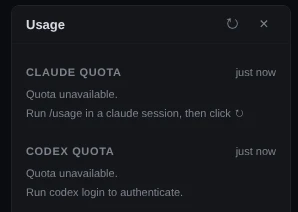
Demo data Both quotas unread, each with the step that fixes it. The deck’s answer for both quotas was supplied to the page for this picture. Run /usage in a claude session, then click ↻: the deck got no Claude reading. Do that, then click ↻ at the top of the panel.No quota to show., withThis install signs in with an API key (or Bedrock/Vertex): that install has no quota window, and this does not change.Anthropic asked the deck to wait — it will retry on its own.andWaiting for the next allowed read — or click ↻.clear by themselves.Run codex login to authenticate.orCodex session expired — run codex login.: runcodex login.API-key login — ChatGPT quota is only available for codex login.: Codex signs in with an API key, which has no ChatGPT quota to show.ChatGPT API unreachable — click ↻ to retry.: no Codex reading yet. The deck also shows it before its first Codex reading has come back, so it does not prove the network is down.
Since 3.31.0, when Anthropic’s status page reports an incident on Claude Code or the Claude API, or OpenAI’s on Codex, its CLI or its VS Code extension, a line under that quota’s heading says so and links to the page. An incident elsewhere on those pages, such as one in claude.ai or ChatGPT, is not shown. With
AGENTS_DECK_NO_INSTALL=1orAGENTS_DECK_NO_STATUS=1set, the deck does not read the status pages.In the topbar, this month unavailable means ccusage could not be read. The deck tries
AGENTS_DECK_CCUSAGE, its own copy, accusageon your PATH, thennpx -y ccusage@latest. Installing ccusage yourself, or pointingAGENTS_DECK_CCUSAGEat it, is enough.On a card, not priced means this build holds no published rate for that model: the tokens are counted and the dollars are not. A newer ccdeck can carry the rate.
See what your sessions cost and how much quota is left has the rest of the Usage panel.
If something goes wrong
The pill in the topbar reads paused
The canvas is paused. Events keep arriving and are applied when you resume: press Space.
A tab says Too many ccdeck tabs are open
The browser keeps at most six live connections to one address, and other ccdeck tabs hold them. Close one, and this tab connects by itself.
The report says unknown option
ccdeck does not know that flag, and went on without it. Check the spelling in npx ccdeck --help.
--stop --port says refusing to stop every deck when you asked for one.
The value after --port is missing or is not a port number, so nothing was stopped. Use the port npx ccdeck --status prints, or npx ccdeck --stop alone to stop every deck.
--stop says could not stop pid <n> on <port>
That deck did not answer, and could not be ended. npx ccdeck --status shows what is still running.
Codex sessions arrive twice, and the report has a Codex hooks row
The row reads left by an older deck in <file>, so Codex sessions can arrive twice. An older deck left its forwarders in Codex’s hooks.json. npx ccdeck --uninstall takes them out. It also removes the Claude Code hook, which the next npx ccdeck writes again, and the login item if there is one, which ccdeck --install-service puts back.
npx ccdeck --install says npm will not overwrite a command another global package owns
An install under the deck’s old names, agents-deck or agent-dag, owns the command. Run npm rm -g agents-deck agent-dag, then npm i -g ccdeck, then ccdeck --install-service if the deck should start at login.
npx ccdeck --install says npm cannot write to the global prefix
Do what the message says: run sudo npm i -g ccdeck, or point npm at a folder you own with npm config set prefix ~/.npm-global, add its bin to your PATH, and install again.
On Windows, the deck ended when an ssh session closed
Windows OpenSSH ends every process started in the session. Start the deck from an ordinary Windows terminal, or let the login item start it.
macOS: an account row says keychain unreadable
This is about the deck, not the account or the settings file: the deck was started somewhere that cannot open your keychain, such as over ssh. Start ccdeck from a Terminal window on the Mac. Use several Claude accounts has more. Until then, a share of accounts made on that deck fails too; Move a Claude account to another machine quotes the line it shows.