Start ccdeck for the first time
ccdeck running in the background, its Claude Code hook in place, a first session on the canvas, and the commands to check, stop and keep it.
Before you start
- Node.js 18 or newer, on macOS, Linux or Windows, and a browser.
- Claude Code, Codex, or both. With only one of them on the machine, the deck skips the other and says so when it starts.
- Nothing else: no account, no API key and no config file.
Steps
-
Run npx ccdeck
Run this in any terminal:
npx ccdeckThe deck prints a start-up report, opens your browser and gives you the prompt back. Two rows of the report matter on a first run:
Claude hooks, with a path: the hook Claude Code sends its events through was written. Step 4 says what it is.server ready, with the deck’s address. It ishttp://127.0.0.1:4317unless something that is not one of your decks already holds port 4317. Then the deck tries up to ten random ports between 4318 and 4400 and prints the one it got. This line is the address to use.
The other rows depend on the machine.
Codex sessionsreadswatchingwhen the deck found Codex, andskippedwhen it did not. Long paths may be cut short with … to fit the terminal.The report ends with
running in the background · `npx ccdeck --stop` ends it. Runningnpx ccdeckagain while the deck is up does not start a second deck. It printsdeck already runningwith the address, and opens that deck’s tab.Started with npx? Two lines of the report leave
npxout:`ccdeck` brings this deck backand`ccdeck --install` also starts it at login. Until ccdeck is installed globally, type them asnpx ccdeckandnpx ccdeck --install. -
Go through the tour, or close it
The first time a browser opens the deck, the tour opens by itself. It is called What the deck shows you: eight pictures, each with a line under it, and on two of them a quieter second line.
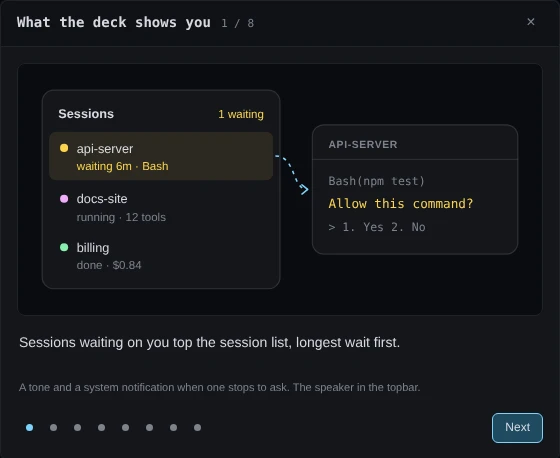
Demo data The tour in ccdeck 3.31.0, on its first step. The counter beside the title and the dots at the foot show where you are. Next already has focus, so Enter or → moves on, and Back or ← goes back. The dots jump to a step. ×, Esc or a click outside the dialog closes the tour from any step, and on the last step the button reads Done.
The tour counts as seen only when you close it. This browser remembers that for this address. A first run shows the tour, and not the release notes.
Behind the tour, three panels are open the first time: Usage, This machine and Claude accounts. U, S and A open and close them. A panel you close stays closed the next time.
Claude Code only. The Claude accounts panel, and its key A, are there only when the deck finds Claude Code.
-
Read the empty canvas
With the tour closed, the canvas stays empty until a session sends something. It says Waiting for Claude Code or Codex, how to start one, and one line for each CLI naming what the deck needs to see it. A line that starts
Claude Code capture is offorCodex capture is offmeans the deck did not find that CLI, or was started without it.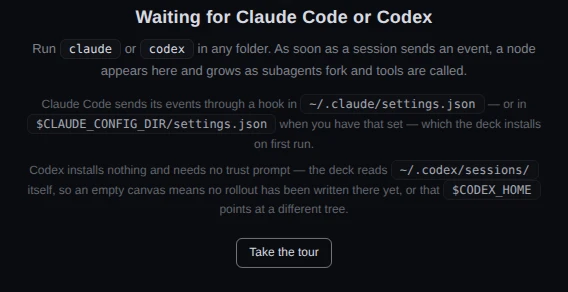
Demo data The empty canvas in ccdeck 3.31.0, with both CLIs found: the Claude Code line names the hook, the Codex line names the folder the deck reads. The deck’s answer that it watches every folder was supplied to the page for this picture. Take the tour opens the eight pictures again. The button is only on the empty canvas, and goes once a session is drawn. After that, press ?, or click the question-mark button at the foot of the canvas controls: the keyboard shortcuts open with a Take the tour button at the top.
-
Look at what the deck added for Claude Code Claude Code only
On its first run the deck adds its hook to
~/.claude/settings.json, or to$CLAUDE_CONFIG_DIR/settings.jsonwhen you have that set. It adds one entry for each of ten Claude Code events:SessionStart,UserPromptSubmit,PreToolUse,PostToolUse,PostToolUseFailure,SubagentStart,SubagentStop,Stop,SessionEndandNotification. Each entry is marked"__agent-dag": true, has"timeout": 3, and runsnodeon~/.claude/agent-dag/hook.js, a copy of the deck’s forwarder (under$CLAUDE_CONFIG_DIRwhen that is set). Your own hooks and settings stay as they are.The hook sends each event only to decks on
127.0.0.1, and only after the deck proves it is the one that registered. With no deck running it finds none and exits. It ends itself within about two seconds; Claude Code would stop it at three.It cannot allow, deny or change a tool call. A Claude Code hook answers through its exit code or through what it writes to standard output, and this one always exits 0 and writes nothing there. A test in ccdeck checks both.
The deck writes the entries again on every start where it finds Claude Code, without doubling them, so an entry you delete by hand comes back.
npx ccdeck --uninstallremoves them.Codex gets no hook and no trust prompt. The deck reads the rollout files Codex writes under
~/.codex/sessions, or under$CODEX_HOMEwhen you have that set. -
Start a session
Run
claudeorcodexin any folder and give it something to do. The session appears on the canvas, and the empty-canvas text and Take the tour go away.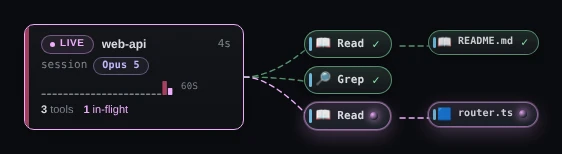
Demo data A new Claude Code session in ccdeck 3.31.0, with its third tool call still running. The card carries the folder’s name, the word session, a state pill (LIVE while it works, DONE once it stops), the model, and counts of tools and in-flight calls. Each tool call is drawn beside the card as it runs.
Claude Code and Codex differ here. A Claude Code session appears as soon as its first hook event reaches the deck. A Codex session appears once Codex writes to its rollout file; the deck checks for new lines every 1.5 seconds.
A session that was already running when the deck started appears the next time it does something. Its card shows ? beside the name and ≥ before its time, because the deck did not see it begin.
-
Check that the deck is running
Closing the terminal does not stop the deck. Neither does Ctrl + C once the prompt is back: it only cancels a start that is still printing. From any terminal:
npx ccdeck --statusIt lists each running deck with its version, pid, uptime and address, and marks the one a plain
npx ccdeckwould open withopens this one. With nothing running it saysno deck is running. To get the tab back, runnpx ccdeck. -
Stop the deck when you want it off
npx ccdeck --stopIt stops every running deck and prints
stoppedwith each one’s pid, port and how long it was up. Add--portand a number to stop only the deck on that port.To have the deck hold the terminal and stop on Ctrl + C, the way versions before 3.20 did, start it with
npx ccdeck --foreground.A deck that crashes restarts itself, up to five times in ten minutes. After that it stays stopped and says why in its log, which
npx ccdeck --logsprints. -
Keep the deck across a reboot
Whether the deck starts again when you log in depends on how ccdeck was installed.
- Installed globally, with
npm i -g ccdeck: the first run sets this up by itself, once per machine, and saysccdeck will now start when you log in. - Run with
npx ccdeck: it cannot. The login item would point into npm’s cache, which npm clears without warning. Run this instead:
npx ccdeck --installIt installs ccdeck globally with npm, then adds the login item: a launchd agent on macOS, a systemd user unit on Linux, a Task Scheduler logon task on Windows. It says
ccdeck is on your PATH, thenand starts when you log in. From then onccdeckworks withoutnpx.At login the deck starts without opening a tab.
ccdeck --uninstall-serviceremoves the login item and leaves ccdeck installed.Linux only. systemd ends a user’s services at logout unless lingering is on for that user.
--installprints the command that turns it on,sudo loginctl enable-linger $USER, and does not run it for you. - Installed globally, with
If something goes wrong
The browser did not open, or you closed the tab
The deck is still running. Run npx ccdeck again: it prints deck already running with the address and opens the tab. npx ccdeck --status prints the address too.
server ready shows a port other than 4317
Something that is not a ccdeck deck holds 4317. On Windows, a reserved port range can cover it. Use the address on the server ready line. The tour and your panel choices are kept per address, so the tour can open again there. --port and a number asks for a port of your choosing.
Claude hooks says not installed, and the deck exits
The deck could not update your Claude Code settings.json, and the message under the row names the file and the reason. If the file is not valid JSON, the deck will not overwrite it: repair it, or move it aside, and run npx ccdeck again. npx ccdeck --no-claude starts the deck without Claude Code.
Claude hooks says skipped, and the canvas says Claude Code capture is off
The deck did not find Claude Code. If it is installed, start the deck with npx ccdeck --claude.
Codex sessions says skipped, or no Codex session appears
The deck found no ~/.codex/. If Codex keeps its files elsewhere, set CODEX_HOME to that folder, or start the deck with npx ccdeck --codex. A Codex session that was already running appears when it next writes.
ccdeck: command not found
The deck was started with npx, so ccdeck is not on your PATH. A few lines the deck prints leave npx out, such as `ccdeck --install` also starts it at login. Type npx ccdeck or npx ccdeck --install.
The page says Server unreachable or Disconnected from server
The deck is not running: it was stopped, or it crashed more often than it restarts itself. The page asks you to check your terminal, but the deck runs in the background, so run npx ccdeck --status. If nothing is running, run npx ccdeck, and the page reconnects by itself. npx ccdeck --logs prints the last 200 lines of the deck’s log and where the file is.
The tour did not open
This browser already closed it at this address, or it refuses site storage, and then the tour never opens by itself. Click Take the tour on the empty canvas, or press ? and click it there.
After a reboot the deck is gone
A deck started with npx ccdeck never starts at login. Run npx ccdeck --install, as in step 8.
npx ccdeck --install says npm cannot write to the global prefix
Your user cannot write to npm’s global folder. Do what the message says: run sudo npm i -g ccdeck, or point npm at a folder you own with npm config set prefix ~/.npm-global, add its bin to your PATH and run npm i -g ccdeck. Once ccdeck is installed, ccdeck --install-service adds the login item.
On Windows, the deck ended when an ssh session closed
Windows OpenSSH ends every process started in the session. Start the deck from an ordinary Windows terminal, or let the login item start it.