See which session is waiting on you
The Claude Code sessions stopped on you, at the top of the session list with how long each has waited, and a tone when a new one asks.
Before you start
- ccdeck running and open in a browser.
npx ccdeckopenshttp://127.0.0.1:4317, or a port from 4318 to 4400 that it prints when 4317 is taken. - Claude Code installed, so that the deck registers its hook on first run. In the terminal where the deck started, the Claude hooks line has a ✓. If it reads “skipped — no Claude Code found, or --no-claude”, no session will ever show as waiting.
- Claude Code sessions in a folder the deck captures. That is every folder, unless the deck was started with
--workspaceor--scope. - For notifications only: a browser that may show notifications for the deck’s address. On Linux, a running notification daemon as well.
Steps
-
Open the session list
Press L, or click Session list in the topbar. On a window narrower than 1440 px the button shows only its list icon.
The list starts closed on a new deck, and the deck remembers whether you left it open. To close it, press L again or click the ‹ at its top.
-
Read which sessions are waiting
A session that is stopped on you moves to the top of the list, and the time since it stopped takes the place of its run time, as in waiting 6m · Bash. Three things count as waiting:
- a permission prompt: Claude Code wants to use a tool and will not go on until you answer;
- a question the agent stopped to ask you;
- a finished turn waiting for your next instruction. Claude Code reports it about a minute after the turn ends.
Prompts and questions come first, the longest wait first. Finished turns come next, also the longest wait first, then running sessions, then finished ones. So a turn that finished 12 minutes ago stays below a prompt from 2 minutes ago.
The tool name after the time is the deck’s guess, not something Claude Code reports: the newest call still running in that session when the prompt arrived, shown only if it started within 30 seconds of the prompt. Hover the time to read Claude Code’s own sentence, the guess (“Likely on: …”) and when the wait started.
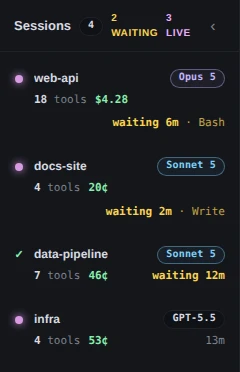
Demo data Two prompts at the top, the older one first, then data-pipeline’s finished turn. The header counts 2 waiting, not 3: a finished turn is not counted. Claude Code only. A Codex session is never marked waiting. It keeps its place among the running and finished sessions; step 7 says why.
-
Go to the session that has waited longest
The amber 2 waiting in the topbar counts the sessions on a permission prompt or a question. Finished turns are not counted. Click it to go to the session that has waited longest.

Demo data Two sessions are on a permission prompt. data-pipeline’s finished turn is left out of the count. Press W to do the same from anywhere. Each press after that goes to the next waiting session, and after the last one it starts again from the first. Clicking a row in the session list goes to that session instead. All three make it the selected session, bring its card on screen and open the detail panel.
The count reaches you in other tabs too: while it is above zero, the browser tab reads “(2) ccdeck” and its icon is a solid amber disc. When the waiting sessions change, a screen reader hears who is first, as in “web-api and 1 more session are waiting for your permission.”, and “No sessions are waiting for you.” once they are all answered. The count goes away when nothing is left to count. On a window 640 px wide or narrower it shows only its number.
While Anthropic’s or OpenAI’s status page reports an incident on something your sessions use, a link such as Claude · partial outage sits just before the count. It opens that status page. It is about the provider, not a session waiting on you, and it is not there while the page reports no incident.
-
Read the card, then answer in the terminal
A waiting session’s card has a row of its own under its title.
- For a prompt or a question, the row is amber, with a pulsing dot, the start of Claude Code’s own sentence and a clock. For a question, the sentence is the question. Hover the row for the whole sentence.
- For a finished turn, the row reads Your turn in the session’s own colour, with a still dot.
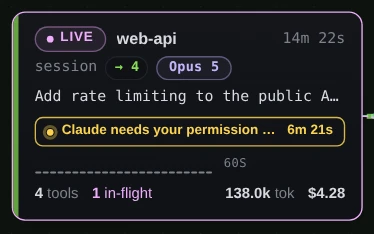
Demo data The row keeps the clock and cuts the sentence to fit the card. 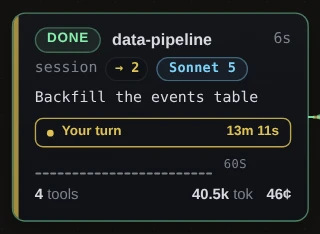
Demo data A finished turn: the session reads DONE, and the row says whose move it is. Zoomed out, a card shrinks to its name and one line. For a prompt or a question that line is the same sentence, or Needs you or Asked you where the sentence does not fit, and the card and its session’s label carry a warning triangle. For a finished turn it reads Your turn.
Answer in the terminal where Claude Code is running. ccdeck cannot allow, deny or reply: its hook only forwards events. The row goes away as soon as the session moves again.
-
Set up the sounds
Click Sound in the topbar, or press V. The Sounds switch turns both tones on or off, and M does the same from anywhere.
- Turn finished plays when a Claude Code or Codex session finishes a turn.
- Claude is asking plays whenever Claude Code sends a notification: a prompt, a question, or the reminder about a finished turn.
Each tone has its own Volume, Tone and Hear it. Hear it plays even while Sounds is off. Sounds start on, at 50%, and this browser remembers what you set. They play only from an open deck tab, and only after you have clicked or pressed a key on the page since it loaded.
Claude Code only. The Sound button, V and M are there only when the deck found Claude Code, and Claude is asking never plays for Codex. Codex finished turns do play Turn finished.
-
Turn on notifications for when you are away
In the same menu, click the Notifications while closed switch to turn it on. It is off by default. If the browser has not been asked yet, turning it on asks for permission; allow it. Browser notifications then reads Enabled. An Enable button there means the question was dismissed; click it to ask again. Blocked can be undone only in the browser’s own site settings.
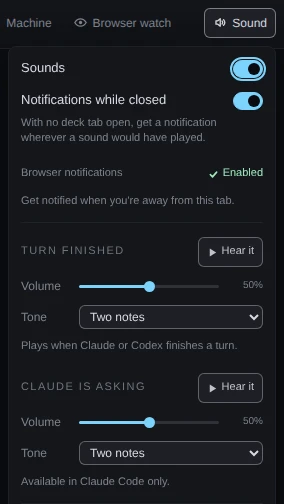
Demo data Both switches on, and the browser has allowed notifications. That notification state was supplied to the page for this picture. The one switch covers two kinds of notification, and neither appears while the deck is on screen:
- With a deck tab open but hidden, the page shows a browser notification for each new prompt or question. Its title is the session’s name, and its text is Claude Code’s sentence and “Likely on: …”. Clicking it brings the tab back to that session. Prompts that were already there when the page opened, or when you allowed notifications, are not announced.
- With no deck tab open, the deck shows a system notification wherever a sound would have played: Claude Code prompts, questions and finished turns, and Codex finished turns.
-
Know what Codex sessions do not show
Codex sessions are on the canvas and in the session list, but they are never marked waiting: no row, no count, no tab title or icon, no Claude is asking tone and no browser notification. ccdeck reads Codex from its rollout files, and a rollout records no approval request, so the deck cannot tell a Codex session that is asking you from one that is busy.
While a Codex session is running under an approval policy that can ask, or one the deck has not read yet, its card says approvals not visible. Hover it for the reason, and check that session’s terminal. At the policy
neverthe card says nothing, because the session cannot ask.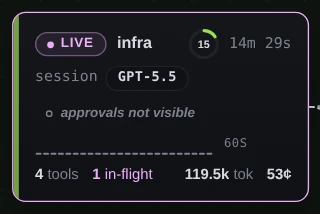
Demo data infra runs under the on-requestpolicy. In the session list it shows a run time, not a wait.
If something goes wrong
A session is at the top with “waiting 12m”, but the topbar shows no count and W does nothing
It is a finished turn waiting for your next instruction, and its card reads Your turn. Finished turns sort above running sessions but are left out of the count on purpose. Type the next instruction in that session’s terminal, or leave it.
A Codex session is waiting for approval, and ccdeck shows nothing
The deck has no signal for it (step 7). Check the Codex terminal. If the card shows approvals not visible, that session’s policy can ask.
No Claude Code session ever shows as waiting
Look at the Claude hooks line the deck printed when it started. If it says “skipped”, the deck did not find Claude Code, or was started with --no-claude, and installed no hook. If Claude Code is installed, start the deck again with --claude. The new start stops the running deck first, because that one was started with different settings:
npx ccdeck --claude
A deck started with --workspace or --scope captures only sessions inside that folder. A session that sends nothing for 90 minutes also stops showing as waiting.
No sound
Sounds may be off: press M. The page may not have been clicked, or had a key pressed, since it loaded; browsers play nothing until then, and the Sound button’s tooltip says “Waiting for a click”. Sounds also need an open deck tab, and events the deck replays when a tab opens never play. Hear it in the Sound menu checks the level.
There is no Sound button, and V and M do nothing
The deck did not find Claude Code, so it draws no Claude-only controls. If Claude Code is installed, start the deck again with --claude, as above.
No notification arrives
Check each of these. Notifications while closed is off, which is the default. Browser notifications reads Blocked: allow notifications for the deck’s address in the browser’s site settings. The deck tab is on screen: the page notifies only while it is hidden. The prompt was already there when you opened the deck. On Linux, no notification daemon is running, and nothing says so.
If the menu says “Held off for this run — the deck was started with alerts disabled”, the deck was started with AGENTS_DECK_NO_NOTIFY=1. Stop it with npx ccdeck --stop, then start it again without that variable; the switch keeps your choice.