Use ccdeck with Codex
Codex sessions on the ccdeck canvas from their rollout logs, with tokens and quota, what the deck cannot see, and a Codex-only start.
Before you start
- Node.js 18 or newer.
npx ccdeckinstalls the current release; this guide was checked against 3.31.0. - The Codex CLI, run at least once, so that its folder exists:
~/.codex, or the folderCODEX_HOMEnames. - For the quota in step 6: Codex signed in with
codex loginand a ChatGPT account. An API-key login has no quota to show.
Steps
-
Start the deck and find the Codex row
Run this in any terminal:
npx ccdeckThe report it prints has one row for Codex:
Codex sessions watchingand a folder: the deck found Codex and reads the rollout files in that folder. It is$CODEX_HOME/sessions, or~/.codex/sessionswhenCODEX_HOMEis not set or is empty. A long path may be cut short with ….Codex sessions skipped — no ~/.codex/, or --no-codex: no Codex folder existed when the deck started, or the deck was started with--no-codex. The row names~/.codex/even whenCODEX_HOMEis set.
Nothing is installed for Codex. There is no hook and no trust prompt, and starting the deck writes nothing in the Codex folder. The deck reads the rollout file Codex writes for each session.
If Codex keeps its files in another folder, start the deck with the same
CODEX_HOME, and the row names that folder. In PowerShell, set it first:$env:CODEX_HOME="D:\codex"; npx ccdeck.CODEX_HOME=~/codex-home npx ccdeck -
Start a Codex session
Run
codexin any folder and give it something to do. If the deck was started with--workspaceor--scope, run it inside that folder: the deck keeps or skips a Codex session by the folder the session started in.The card appears once Codex writes to its rollout file. The deck looks for new lines every 1.5 seconds, in the two newest day folders under
sessions. The card is named after the folder and opens as LIVE.A Codex session that was already running when the deck started appears the next time it writes. The deck reads its file from that point on, so nothing the session did before is shown.
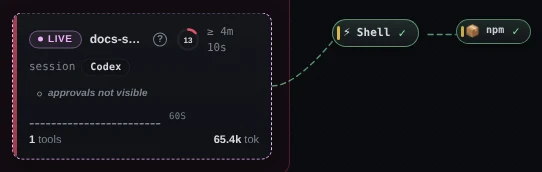
Demo data A session that began before the deck did: ? beside its name, ≥ before its time, and a Codex chip until its next turn names the model. Hover ? to read “No SessionStart captured — synthesised”, and the time to read “The deck joined this session after it began, so it has run at least this long — first seen …”. Until the session’s next turn starts, the deck has not read its model or its approval policy: the chip reads Codex, and the card shows tokens but no cost.
-
Read a Codex card
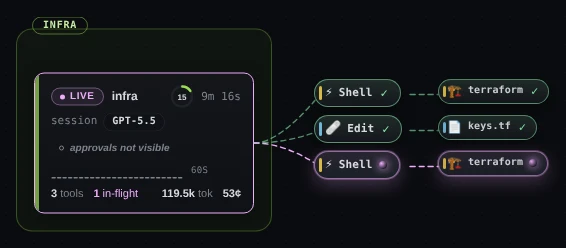
Demo data A running Codex session. Its third call, a Shell call to terraform, has no result yet, so its bubble shows a spinner where the others show ✓.The state pill reads LIVE while a turn runs. It turns DONE when Codex finishes the turn, or when you press Esc in Codex, and LIVE again at your next prompt. The chip names the model Codex reported:
gpt-5.5prints as GPT-5.5.A Codex card has no title row and no subagent cards, because a rollout file records neither. Its last row counts the calls (tools), any that failed (err) and those still running (in-flight), then gives the tokens (tok) and an estimated cost. tok is Codex’s input, cached tokens included, plus its output. Hover it for the split, and the cost for the sum, which prices cached tokens at the cache rate.
On the canvas, Codex’s tools get the deck’s names: Shell for
exec,exec_command,shellandshell_command, Edit forapply_patch, Plan forupdate_plan, Web forrun, stdin forwrite_stdin, and wait. A tool the deck does not know keeps its own name. Beside a Shell bubble a second bubble names the program; beside an Edit bubble, the file.Hover a bubble for Codex’s own name for the tool and what it was given, for example “exec_command · {"cmd":"terraform plan"}”. The detail panel and the tool dialog use Codex’s own names too; Read a session on the canvas shows how to open them.
A call counts as failed only when Codex’s result begins “Script failed”, or “Exit code:” with a number other than 0. Any other result counts as a success.
-
Open the context breakdown
Click the ring on the card. A screen reader announces it as “Context 15% of 258,400 tokens — show breakdown”.
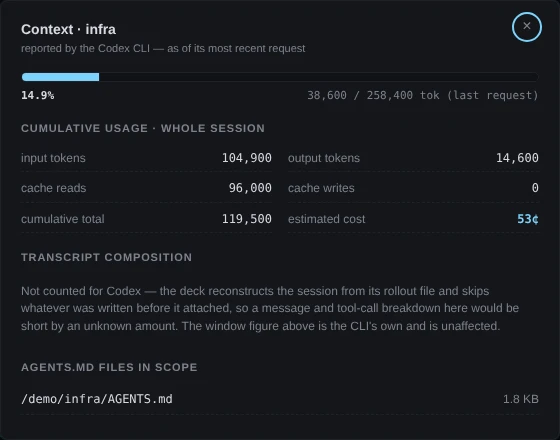
Demo data The window figure is the Codex CLI’s own, from its last request. The message and tool-call counts are left out, and the dialog says why. For Codex, both figures at the top come from the Codex CLI and describe its most recent request: the tokens in the context window and the window’s size. Under them is the session’s usage so far and its estimated cost. The dialog does not count messages and tool calls for Codex: the deck skips whatever a rollout file held before it started reading, so the counts would be short. The last section lists the
AGENTS.mdfiles in scope, each one from the session’s folder up to the root of the disk, and$CODEX_HOME/AGENTS.md. Press Esc to close the dialog.Claude Code differs. Its dialog is subtitled “approximation — CC's /context isn't hook-exposed”, counts messages and tool calls, and lists
CLAUDE.mdfiles. -
Watch the terminal for approvals
Codex writes no approval request to its rollout files, so the deck cannot tell when a Codex session has stopped to ask you something. A Codex session never gets a waiting row, never counts in the session list’s waiting figure, and never changes the topbar count, the tab title or the favicon. With sound on, the deck plays its finish tone when a Codex turn ends, but never the tone for a session that asks for you.
Instead, a running Codex card says approvals not visible when its approval policy can ask (
untrusted,on-requestoron-failure) or has not been read yet. The line is not there atnever, which cannot ask, or on a DONE card. Hover it for the reason, which ends “Check the terminal.”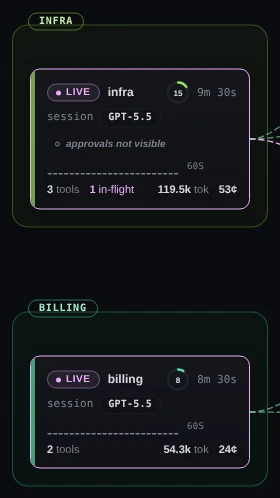
Demo data infra runs under on-requestand says approvals not visible. billing runs undernever, and its card says nothing about approvals.A call with no result yet looks the same whether it is running or waiting for your approval. Its bubble keeps its spinner, its dialog says in-flight… and (waiting…), and the deck never marks it failed for being quiet.
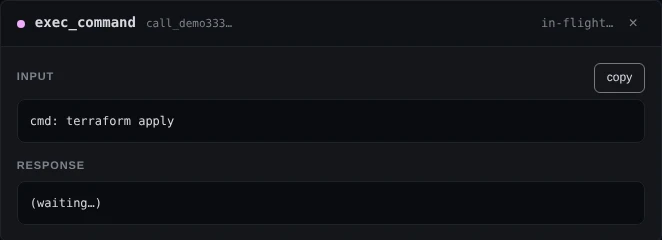
Demo data infra’s terraform apply, with no result yet. Whether it is still running or waiting for an approval in the terminal, the dialog shows the same.Claude Code only: waiting on you. The waiting rows, the count and the asking tone in See which session is waiting on you are for Claude Code sessions.
-
Read your Codex quota
Press U, or click Usage in the topbar. In a window narrower than 1440 px the button shows only its icon, and its tooltip reads “Show usage panel (U)”.
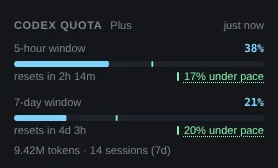
Demo data One bar for each limit OpenAI reports, with when it resets and how the pace compares. The Codex quota section shows your plan and one bar for each limit OpenAI reports, named by its length: “5-hour window”, “7-day window”, “30-day window”, or “Rate limit” when OpenAI gives no length. Each bar shows how much is used, when it resets and how your pace compares. A spend cap and credits appear only when your plan has them.
The line under the bars, such as “9.42M tokens · 14 sessions (7d)”, is counted from the rollout files on this computer. It needs no network and no account, and it stays when the quota cannot be read.
The deck reads the quota about once a minute while the page is open; ↻ in the panel’s header reads it again now. To keep your
codex loginworking, the deck refreshes the token in$CODEX_HOME/auth.jsonthe way the CLI does, when it is within 90 seconds of expiring or the usage endpoint turns it down. It writes back only the token fields, and only while the page is open.Since 3.31.0, when OpenAI’s status page reports an incident on a Codex component, a line under the section’s heading says so and a chip appears in the topbar, both linking to
status.openai.com. An incident elsewhere on that page, such as one in ChatGPT, is not shown. -
Run a deck for Codex only
On a computer where the deck finds no Claude Code, this happens by itself. Where Claude Code is installed, start the deck with
--no-claude:npx ccdeck --no-claudeThe report says
Claude hooks skipped — no Claude Code found, or --no-claudeandclaude-swap skipped — accounts are Claude-only. The deck installs no Claude Code hook and no claude-swap, and does not redraw Claude Code sessions from its log when it starts.
Demo data The topbar at 1440 px with no Accounts and no Sound button. A Codex-only start was supplied to the page for this picture. The topbar has no Accounts and no Sound button, and A, M and V do nothing. The Usage panel shows Codex quota only.
An earlier Claude Code hook stays.
--no-claudedoes not take out a hook that an earlier start put in Claude Code’s settings, and the deck does not turn away what that hook sends.npx ccdeck --uninstallremoves it, and the login item with it.The other switches:
--codexreads Codex even before its folder exists. Sessions appear once Codex creates it, without a restart.--no-codexstops the deck reading Codex. Given both,--no-codexwins.--claudeturns Claude Code capture on when the deck did not find Claude Code.
A start with other switches, or another
CODEX_HOME, replaces the running deck, and the terminal says “stopped the deck on … · pid … · it was started with different settings”. The deck that starts when you log in gets none of these switches and decides by what it finds. On macOS and Linux it gets theCODEX_HOMEthat was set when the login item was made; on Windows it uses your saved user variables.
If something goes wrong
The report says Codex sessions skipped
When the deck started, the Codex folder did not exist, or the deck was started with --no-codex. Run codex once, or set CODEX_HOME to the folder Codex uses, and start the deck again; the new start replaces the running deck. npx ccdeck --codex reads the folder even before it exists.
Codex is running, but no card appears
One of three things. The deck was started with --workspace or --scope, and the session started outside that folder. Codex and the deck use different CODEX_HOME folders: check that the Codex sessions row names the folder Codex writes to. Or the session’s file is in an older day folder than the two newest, which are the only ones the deck reads.
A card shows ?, ≥ and a Codex chip
The session began before the deck started, so the deck reads it only from then on. Nothing needs repairing. The chip changes to the model when the session’s next turn starts.
Every Codex session appears twice
An older deck left hooks for Codex in its hooks.json, and the report says so in a Codex hooks row: “left by an older deck in …, so Codex sessions can arrive twice”. Run npx ccdeck --uninstall, then start the deck again. Uninstall also removes the Claude Code hook, which the next start puts back, and the login item, which npx ccdeck --install-service puts back.
Codex quota says “Quota unavailable.”
The line under it says why, and what to do:
- “Run codex login to authenticate.”: Codex is not signed in on this computer.
- “API-key login — ChatGPT quota is only available for codex login.”: Codex is signed in with an API key, which has no quota to read.
- “Codex session expired — run codex login.”: OpenAI turned the sign-in down.
- “Couldn't refresh the Codex token — click ↻ to retry.”
- “chatgpt_base_url in ~/.codex/config.toml is not an https OpenAI host, so the token was not sent.”
- “ChatGPT API unreachable — click ↻ to retry.”: the network, or the service.
The tokens line under the section is counted from files on this computer and does not depend on the quota.
A card stays LIVE after its terminal was closed
Codex writes nothing when a session closes, so a turn that was running when the terminal went away never ends in its file. The deck ends that session after 90 minutes with no new line. A turn that finished, or that you stopped with Esc, turns the card DONE at once.
A command that failed shows ✓
The deck marks a Codex call failed only from Codex’s own result line, and a plain exec_command result has none. Click the bubble to open the call and read its output.
After a reboot, the deck shows Claude Code again
The deck that starts at login gets no switches, and it found Claude Code. Start it again with npx ccdeck --no-claude, which replaces it.