See what your sessions cost and how much quota is left
Each session's spend, today's and this month's totals from ccusage, and how much Claude and Codex quota is left before each window resets.
Before you start
- ccdeck running and open in a browser, watching Claude Code, Codex or both. Start ccdeck for the first time covers that.
- At least one session that has used tokens. A session’s spend is worked out from its tokens: Claude Code’s are read from its transcript, Codex’s from its rollout file.
- For the totals by day, month and all time, and for Usage history: ccusage, a separate tool published on npm that reads the transcripts both CLIs leave on disk. The deck installs its own copy under
~/.agents-deck/ccusage, when it starts or the first time it needs one, and checks npm for a newer one once a day. Installing it needs npm. Ifccusageis already on the deck’s PATH, the deck uses that copy instead of installing one, andAGENTS_DECK_CCUSAGEnames a copy to use ahead of everything else. Both work underAGENTS_DECK_NO_INSTALL=1. - For the Claude quota (Claude Code only): Claude Code signed in with a Claude subscription. An install that signs in with an API key, or through Bedrock or Vertex, is billed per token and has no quota window.
- For the Codex quota (Codex only): Codex signed in with
codex loginand a ChatGPT account. An API-key login has no ChatGPT quota. - For the Projects report (Claude Code only): your Claude accounts in claude-swap, as in Use several Claude accounts.
Steps
-
Read this month’s total in the topbar
The topbar says this month, then the tokens and the dollars spent since the 1st of this month by your computer’s calendar. Hover it for the exact number of tokens. The figure is ccusage’s, so it covers both CLIs and every session on this machine, including the ones no longer on the canvas. While it is on screen, the deck reads it again every five minutes.
It shows … while it loads, and unavailable when ccusage could not be read. In a window narrower than 1040 px the topbar leaves it out; month in the Usage panel (step 4) covers the same period.
-
Open the Usage panel
Click Usage in the topbar, or press U. In a window narrower than 1440 px the button shows only a dollar sign; a screen reader announces it as “Toggle usage panel”. The panel opens on the right, headed Usage. It is open the first time you open the deck, and after that it stays as you leave it.
From the top, it has the quota of each CLI the deck watches, the period strip (today, month, all), the spend for that period and its tokens, then By model and By session. ↻ in its header reads the quotas and the totals again. × or U closes it.
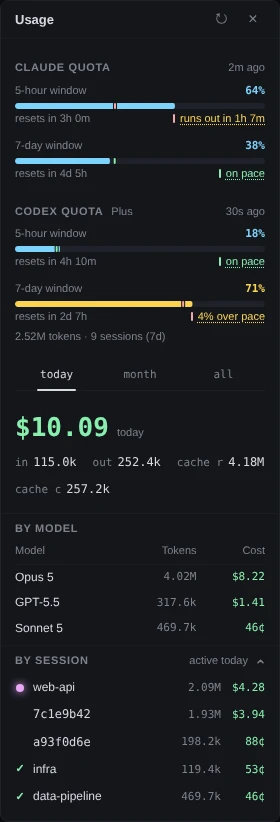
Demo data Both CLIs are watched, so both quotas are drawn. Everything from today down is ccusage’s reading of the day. -
Read how much quota is left
Each bar is one window: how much of it is used, and under it resets in and the time until the window starts again. A bar turns amber from 70% and red from 90%, or when the limit is reached.
Once a window is two minutes old, a line beside the countdown compares your use with the time gone: on pace, so many per cent over pace or under pace, or runs out in and a time when, at the rate so far, use would reach 100% before the reset and within a day. The tick on the bar is where an even rate would be now. Click the line for that figure in words.
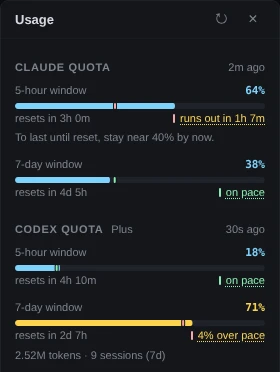
Demo data At the rate so far, the 5-hour window would run out in 1h 7m, nearly two hours before it resets. The age beside each heading, such as 2m ago, is how old the reading is. Hover it to see where it came from. ↻ asks for a new one. When Anthropic’s status page reports an incident on Claude Code or the Claude API, or OpenAI’s on Codex, its CLI or its VS Code extension, a line under that quota’s heading says so and links to the page. An incident elsewhere on those pages, such as one in claude.ai or ChatGPT, is not shown.
Claude Code only. Claude quota has a 5-hour window and a 7-day window, and Sonnet (7d) and Opus (7d) when Anthropic reports them. A 7-day window the source sent no figure for reads no reading. With extra usage on, a bar shows the credits used as a share of the monthly limit, not as money. Saved limit resets are counted, as in “2 limit resets available”; the deck never spends one. The deck reads this quota from claude-swap’s last collection when that is recent. Otherwise it asks Anthropic’s usage endpoint with Claude Code’s own login, or runs
claude /usage, at most once every five minutes.Codex only. Codex quota has one bar for each window OpenAI reports, named by its length, and your plan beside the heading. Credits or a spend cap appear when the account has them. The last line counts the tokens Codex used in the last 7 days, from the rollout files on this machine, with no network.
-
Choose the period the totals cover
Click today, month or all under the quotas. today is since midnight on this machine’s clock, month since the 1st of this calendar month, not the last 30 days, and all every transcript on disk. Hover a word for what it covers. The figure under the strip names the period it is for, as in $10.09 today, and the panel remembers the period you leave it on.
These totals are ccusage’s: every Claude Code and Codex transcript on this machine for the period, priced with ccusage’s own rates. The first time you click a period it can take a few seconds while ccusage reads the transcripts; until it answers, the pressed word is marked and its tooltip says it is reading. After that the panel asks ccusage again once a minute, and in between adds what the sessions on the canvas have used since the last reading, priced by ccdeck.
By model gives each model’s tokens, cache reads and writes included, and its cost.
-
See what each session cost
Click By session in the Usage panel to open its list; it stays open or shut as you leave it. Each row is a session with activity in the period: its tokens, and what ccusage puts against it. Hover a figure for its models. A session still on the canvas has its folder name and its state dot. One that has left the canvas shows the first eight characters of its id, like 7c1e9b42.
ccusage measures a session and a day separately, so the rows can add up to more than the figure above them. When they do, hovering active today gives both sums.
The same session’s spend is on its card, in the session list and at the top of its detail panel; Read a session on the canvas shows where. Those figures are ccdeck’s own: the session’s tokens priced from ccdeck’s price table. Hover the figure on a card to see each kind of token multiplied by its rate.
-
Open Usage history
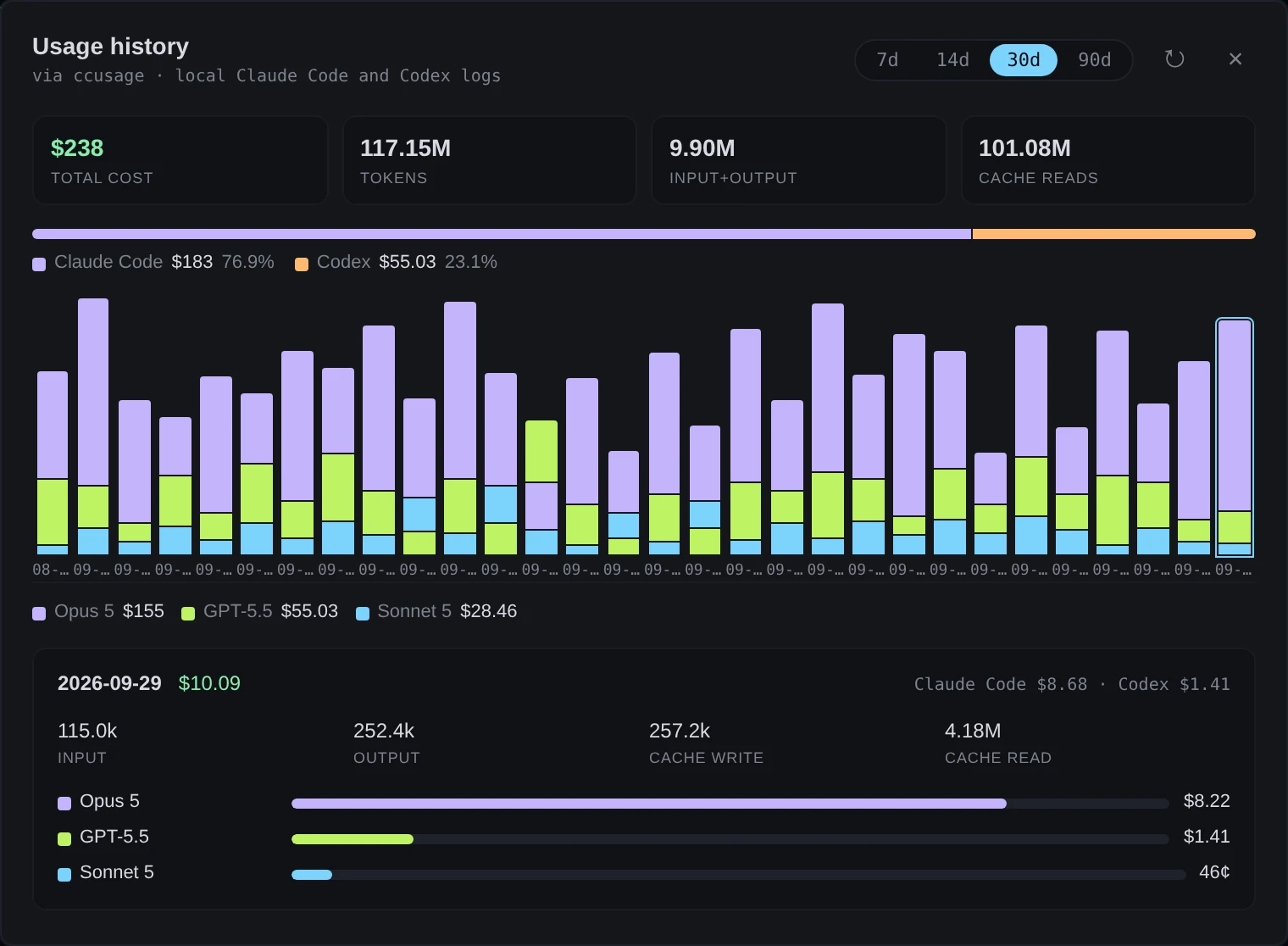
Click History in the topbar, or press H. In a window narrower than 1440 px the button is a bar-chart icon; a screen reader announces it as “Open usage history”. The dialog opens on 30 days. Click 7d, 14d, 30d or 90d for another range.
Across the top are total cost, tokens, input+output and cache reads. When more than one CLI spent in the range, a bar under them splits the cost between Claude Code and Codex, with each one’s share. Each day is a bar, stacked by model. Click a day for its tokens, its cost by CLI and its cost by model, and click it again to close that. ↻ runs ccusage again.
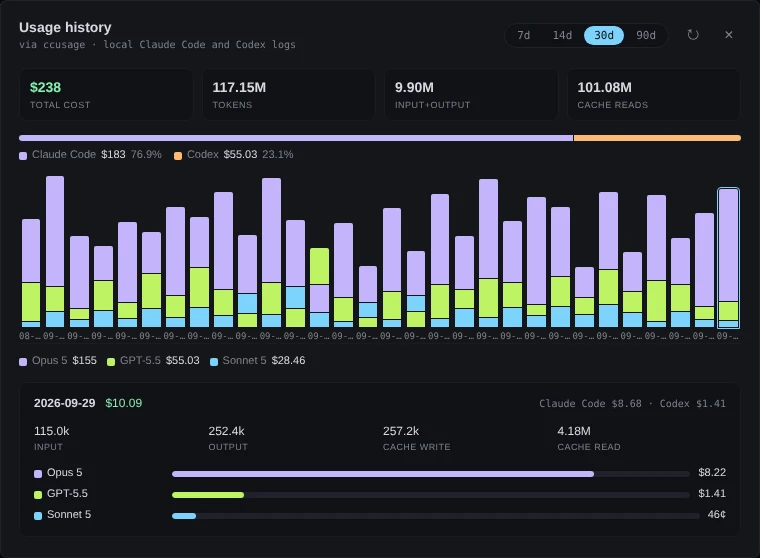 Open the full-size picture
Demo data The last bar is today, clicked. Its $10.09 is the Usage panel’s today. -
See which projects an account’s spend went to Claude Code only
Click Accounts in the topbar, or press A. Click ⋯ on an account, then Projects. The report opens on Today; click 7d, 30d or All for a longer window. All is the last 60 days.
It gives the account’s spend and tokens for the window, a bar of each project’s share, from 7d a chart by day, and a row for each project. Click a day’s bar for that day’s split. Click ⓘ on a row for the project’s folder, with Copy.
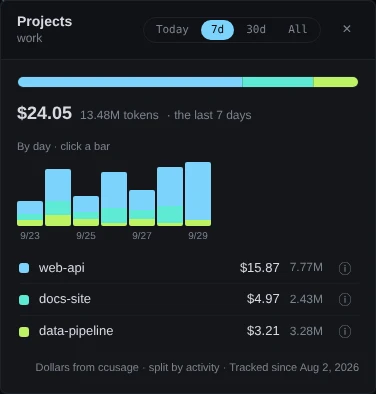
Demo data The footer says the dollars have been matched to ccusage’s. Work is counted for the account that was active when each message was sent. Work that no account can be tied to, from before tracking began or from a gap, is listed apart as Unattributed usage and left out of the totals. The dollars are ccdeck’s prices brought into line with ccusage’s, day by day and model by model. Until that is done, or when ccusage is not there, the footer says Dollars estimated and why.
Claude Code only. The report is made from Claude Code’s transcripts. Codex work is never in it.
-
Read “not priced” and a figure ending in +
not priced stands where a dollar figure would be when there is no published rate for the model: in ccdeck’s price table, for a card, the session list and the detail panel, or in ccusage’s, for the totals. Its tokens are counted and its dollars are not. New rates come with new releases.
A figure ending in +, such as $11.19+, is a minimum: some of its tokens are on a model with no rate. Cards and the Projects report mark it this way, and so do the Usage panel’s session rows when ccusage has not answered. Hover it: the Projects report and the Usage panel say how many tokens have no rate, and a card names the model.
Every dollar here is the tokens counted, priced at the providers’ published per-token API rates. ccdeck’s table is the base rate: no Batch discount, no fast-mode premium, no data-residency multiplier, and no long-context surcharge on Codex. The deck does not know what your plan bills you, and it counts only the transcripts on this machine.
If something goes wrong
The topbar says “this month unavailable”
ccusage could not be read. Press H: Usage history says what failed. The usual causes:
AGENTS_DECK_NO_INSTALL=1is set and the deck has no ccusage. Install ccusage so it is on the deck’s PATH, or unset the variable and restart the deck.- npm and npx are missing, so the deck could not install ccusage. Install npm, or put ccusage on the deck’s PATH.
AGENTS_DECK_CCUSAGEnames a file that is not there. Correct the path, or unset it.
The Usage panel says “spend on this board” and has no today, month or all
ccusage has not answered, so the panel adds up only what is on the canvas. Finished sessions leave the canvas a couple of minutes after they end, and take their spend with them, so the figure falls on its own. Fix ccusage as above.
Claude quota says “Quota unavailable.” and “Run /usage in a claude session, then click ↻”
The deck has no reading yet: claude-swap has no recent collection, no token could be read, and claude /usage printed nothing usable. Run /usage in a Claude Code session, then click ↻ in the panel.
Claude quota says “No quota to show.”
Claude Code signs in with an API key, or through Bedrock or Vertex. That is billed per token and has no window to count against. Spend is still shown.
Claude quota says “Anthropic asked the deck to wait” or “Waiting for the next allowed read”
Anthropic limited the deck’s reads, or five minutes have not passed since the deck’s last one. The deck tries again by itself.
Codex quota says “Quota unavailable.”
The line under it says what to do: “Run codex login to authenticate.”, “Codex session expired — run codex login.”, or click ↻ to retry. “API-key login — ChatGPT quota is only available for codex login.” means there is no quota to show. The 7-day token count is read from files on this machine and still shows.
The Claude quota is many minutes old
It was read from claude-swap’s last collection, which the deck trusts for up to 45 minutes. Hover the age to see the source, and click ↻ to ask for a new reading.
By session says “No session is dated today yet”
ccusage dates sessions by UTC and the totals by your local day, so east of Greenwich the list is empty for a while after midnight. Click month, or wait for the day to start in UTC.
Usage history stops with “ccusage took more than 90 seconds and was stopped”
ccusage reads every transcript on each run, and a long history takes time. Click 7d. The very first run also installs ccusage, and says “running ccusage… (first run downloads the package)” while it does.
Projects says “No work attributed to this account yet today.”
Nothing has been tied to this account today, or its work today was before tracking began. Click Show the last 7 days.
A Claude Code card shows less spend than it did before an update
Before ccdeck 3.30.0, a reply that Claude Code writes as several transcript lines was counted once for each line, so a card’s tokens and spend came out close to double. From 3.30.0 each request is counted once.