Read a session on the canvas
What each card, line and bubble on the canvas means, how to open one agent's details and tool calls, and what a restart brings back.
Before you start
- Node.js 18 or newer.
npx ccdeckinstalls the current release; this guide was checked against 3.31.0. - Claude Code, Codex, or both, with at least one session the deck has seen: one that ran while the deck was running, or an earlier one still in its event log.
- The deck open in a browser tab, at
http://127.0.0.1:4317or the address the terminal printed. - For the keys in this guide: the deck's tab in front and no dialog open. The deck's own advice is “Press Esc first if a key does nothing.”
Steps
-
Choose which sessions the deck draws
Started with no flag, the deck draws every Claude Code and Codex session on this computer.
npx ccdeckTo draw one project only, start it from that project's folder with
--scope, or name the folder with--workspace.npx ccdeck --scopenpx ccdeck --workspace ~/code/web-apiA session belongs to the folder when it runs in that folder or anywhere under it. The same rule decides for Claude Code's hook, for Codex's rollout files and for the event log the deck reads back when it starts. A relative path is resolved once, against the folder you start the deck in, and symbolic links are followed. macOS and Windows ignore case when they compare folder names. Linux does not, so
/srv/projand/srv/Projare two folders.The report in the terminal has a workspace row:
(all)for a deck that draws everything, or the folder it resolved.--statuslists each running deck with its address, its workspace or(all), and its log file.npx ccdeck --statusOne deck at a time. Only one deck runs per Claude configuration directory. A start with a different workspace stops the running deck and takes its place, and the terminal says so: “stopped the deck on 4317 · pid … · it was started with different settings”.
--workspaceand--scopechoose what one deck draws. They are a filter, not a sandbox. -
Read the cards and the lines
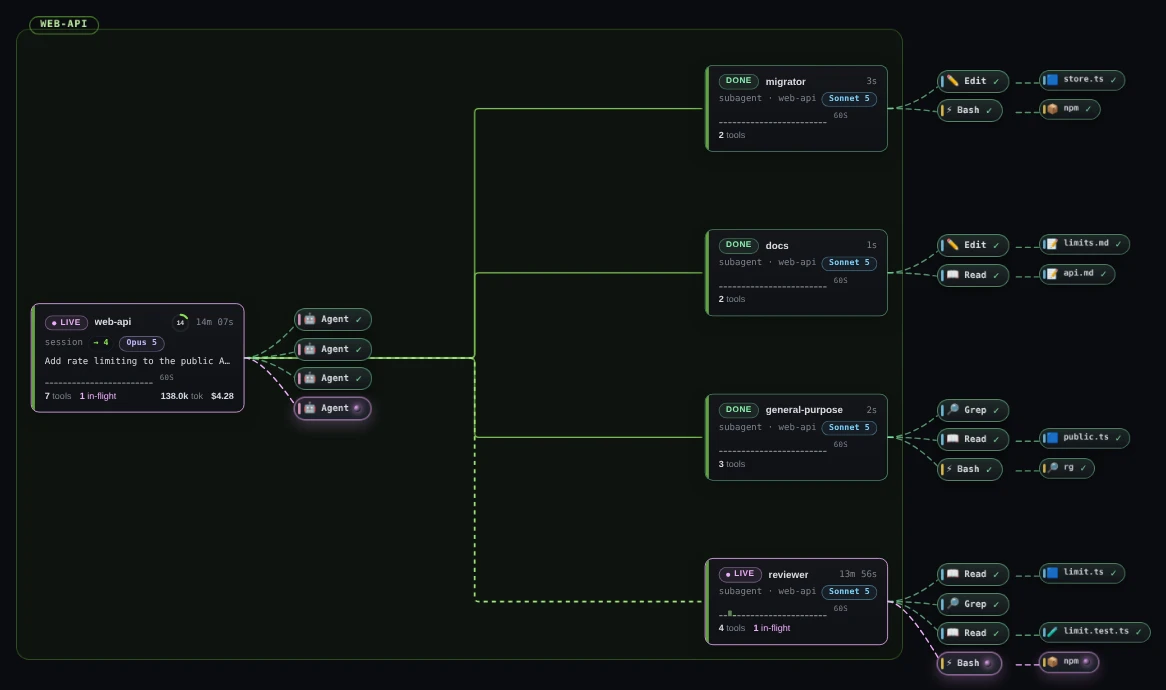
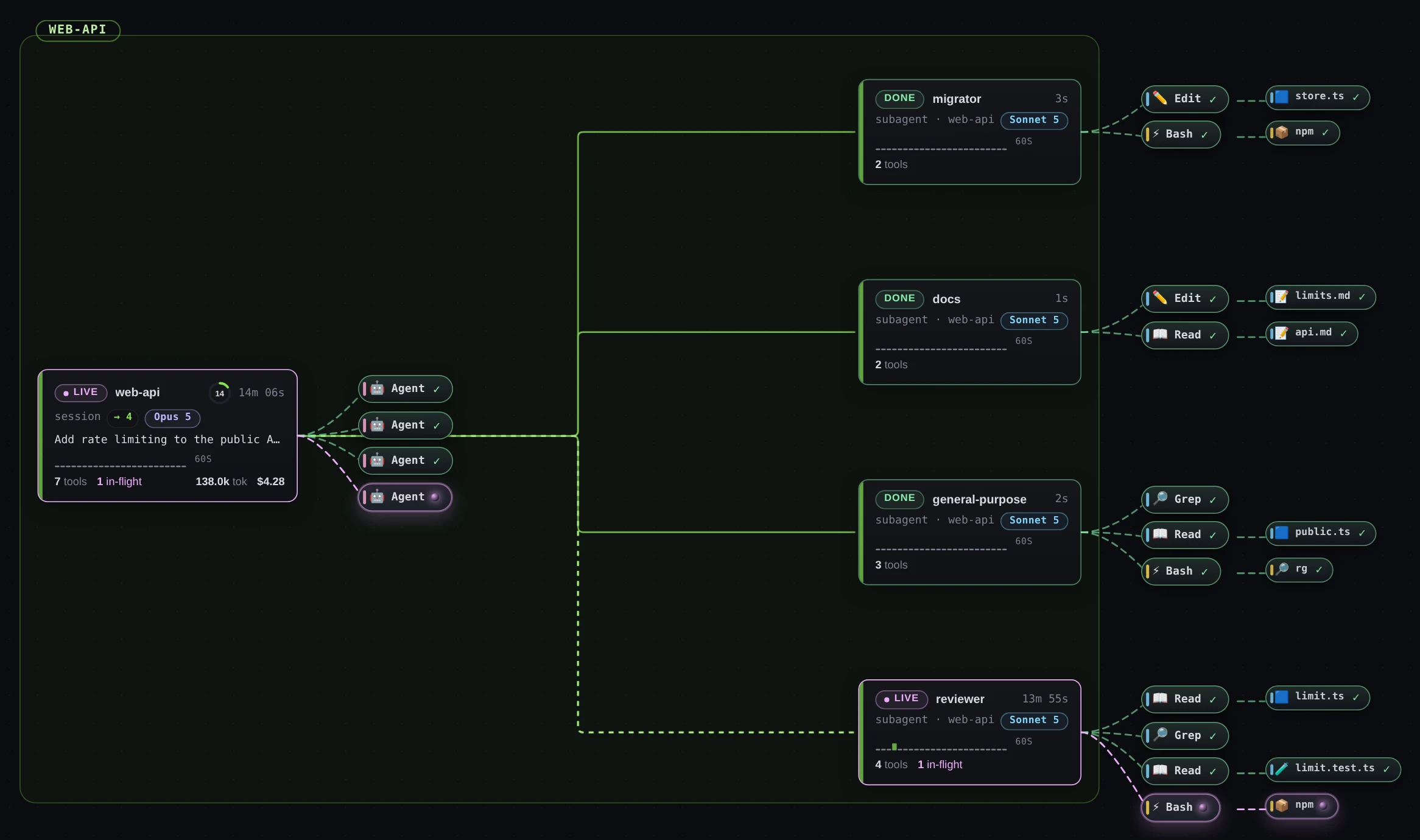
Each card is one agent: a session, or a subagent that a Claude Code session started. A subagent's card sits to the right of its session's card, one level deep, and a line joins the two.
 Open the full-size picture
Demo data One Claude Code session with four subagents. The line to reviewer, which is still running, is dashed; the lines to the three that finished are solid. A card's top row gives its state (LIVE, DONE or ERR), its name and how long it has run. A session is named after its folder, a subagent after its type. The second row says session, or subagent and the folder it runs in, shows → 4 on a session that started four subagents, and holds the model chip. A Claude Code session's title comes next, then a small chart of the last 60 seconds of activity. The last row counts its tool calls (tools), the calls still running (in-flight) and, once a call has failed, how many failed; a session's card adds its input and output tokens (tok) and its spend.
A session's card also has a ring before its clock once the deck knows how full the model's context window is. The number in the ring is the percentage in use; click the ring for the breakdown. For Claude Code the deck estimates it from the session's transcript. Codex reports its own figure.
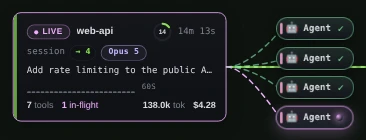
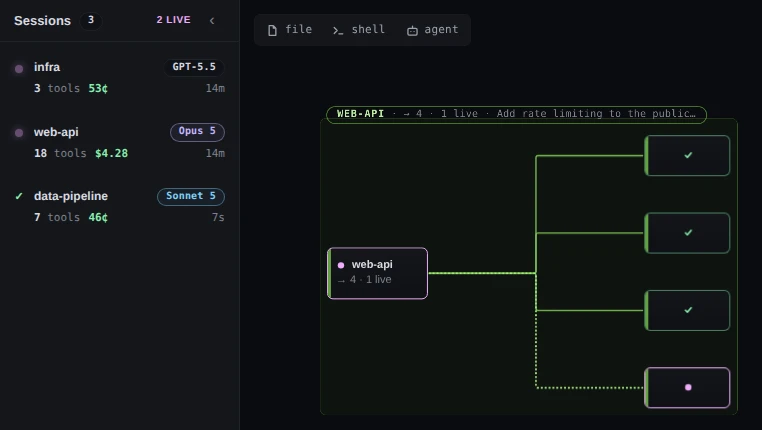
Demo data A session's card. Its four Agent bubbles are the calls that started its subagents; the last one, the call that started reviewer, is still in flight. The line from a session to a subagent is dashed and moving while the subagent runs, and turns solid and thinner, in a duller shade, when it finishes. If your system asks for reduced motion, the dashes stay and do not move.
The bubbles to the right of a card are its last four tool calls, each on a dashed connector. A call that is still running has a spinner and a moving connector, a finished call shows ✓ and a failed one ×. Beside a Bash call, a second bubble names the program it ran, such as
npm; beside a file call, the file.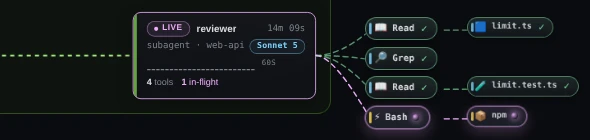
Demo data A subagent that is still running: the line into it is dashed, and its Bash call, npm, has a spinner where the finished calls show ✓. -
Tell Claude Code and Codex sessions apart
Look at the model chip. It names the model, and the model says which CLI it came from: Claude models print as their family and version (Opus 5, Sonnet 5, Haiku 4.5), OpenAI models as GPT-5.5 and the like. A Codex session that has not reported its model yet shows a chip reading Codex. A Claude Code session with no model yet shows no chip.
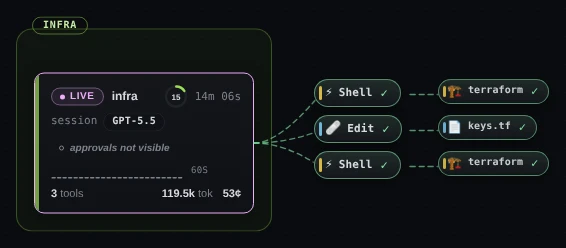
Demo data A running Codex session: a GPT-5.5 chip, no title row, no subagent cards, and “approvals not visible” where a Claude Code card would say it is waiting on you. Codex sessions have no subagent cards. The deck reads Codex from the rollout log Codex writes, and that log records no subagents. It records no session title either, so a Codex card has no title row. Codex's own tools appear as Shell and Edit bubbles.
Claude Code only: waiting on you. Codex writes no approval request to its rollout files, so the deck cannot tell when a Codex session has stopped to ask you something. While a Codex session runs, its card says approvals not visible instead (unless the session's approval policy is
never, which cannot ask). Check the terminal that session runs in. -
Fit the board and move around it
Press F to fit every agent on screen. Drag the empty canvas, or scroll, to pan. To zoom, hold Ctrl (Cmd on macOS) and scroll, pinch on a trackpad, or click the plus and minus buttons in the canvas controls at the bottom left. Click a card to frame it with the rest of its session.
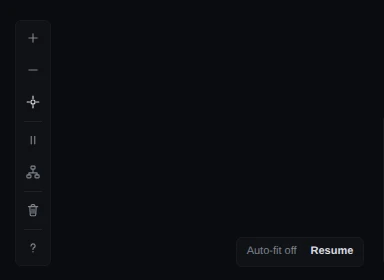
Demo data The canvas controls, and the Auto-fit off chip that appears once you move the view yourself. The crosshair is brighter while auto-fit is off. The seven canvas controls carry symbols rather than words. Hover over one for a tooltip that says what it does and, for four of them, the key that does the same. From the top, the tooltips read:
- plus and minus: “Zoom in” and “Zoom out”;
- the crosshair: “Recenter view + re-enable autofit”, or “Recenter view (autofit already on)”;
- two bars: “Pause live updates — events keep arriving and are applied when you resume (Space)”;
- the tree: “Auto-arrange — clear pins (R)”;
- the bin: “Clear the canvas and the server's event log — asks first (C)”;
- the question mark: “Keyboard shortcuts (?)”.
A screen reader announces them as Zoom in, Zoom out, Recenter view, Pause the canvas, Re-arrange the canvas, Clear the canvas and Open the keyboard shortcuts.
A pan, a zoom, a drag or a click on a card stops the deck from bringing new sessions into view, and the canvas shows Auto-fit off. Click Resume, or the crosshair, to fit the board and turn that back on. F fits once and leaves it off.
Zoomed far out, cards are drawn as small faces that keep their state, and their name where there is room. Hover over one to read its name, state and numbers, or zoom back in to see the whole card.
-
Move from card to card with the keyboard
Every key below works while the deck's tab has focus and no dialog is open. ? opens the full list.
- J and K: the next and the previous agent. Each opens that agent's detail panel.
- Tab reaches the agent cards, and Enter selects the focused card and opens its detail panel.
- Z: zoom to the selected agent and its session.
- F: fit every agent on screen.
- W: the session waiting on you, oldest first; press again for the next. Claude Code only, for the reason in step 3.
- L: the session list. D: the detail panel.
- Esc: close what is open, deselect, release focus.
The arrow keys do not pan the canvas. Letter keys give way to a control you reached with the keyboard, and to your browser's own Ctrl, Cmd and Alt shortcuts.
-
Open the session list
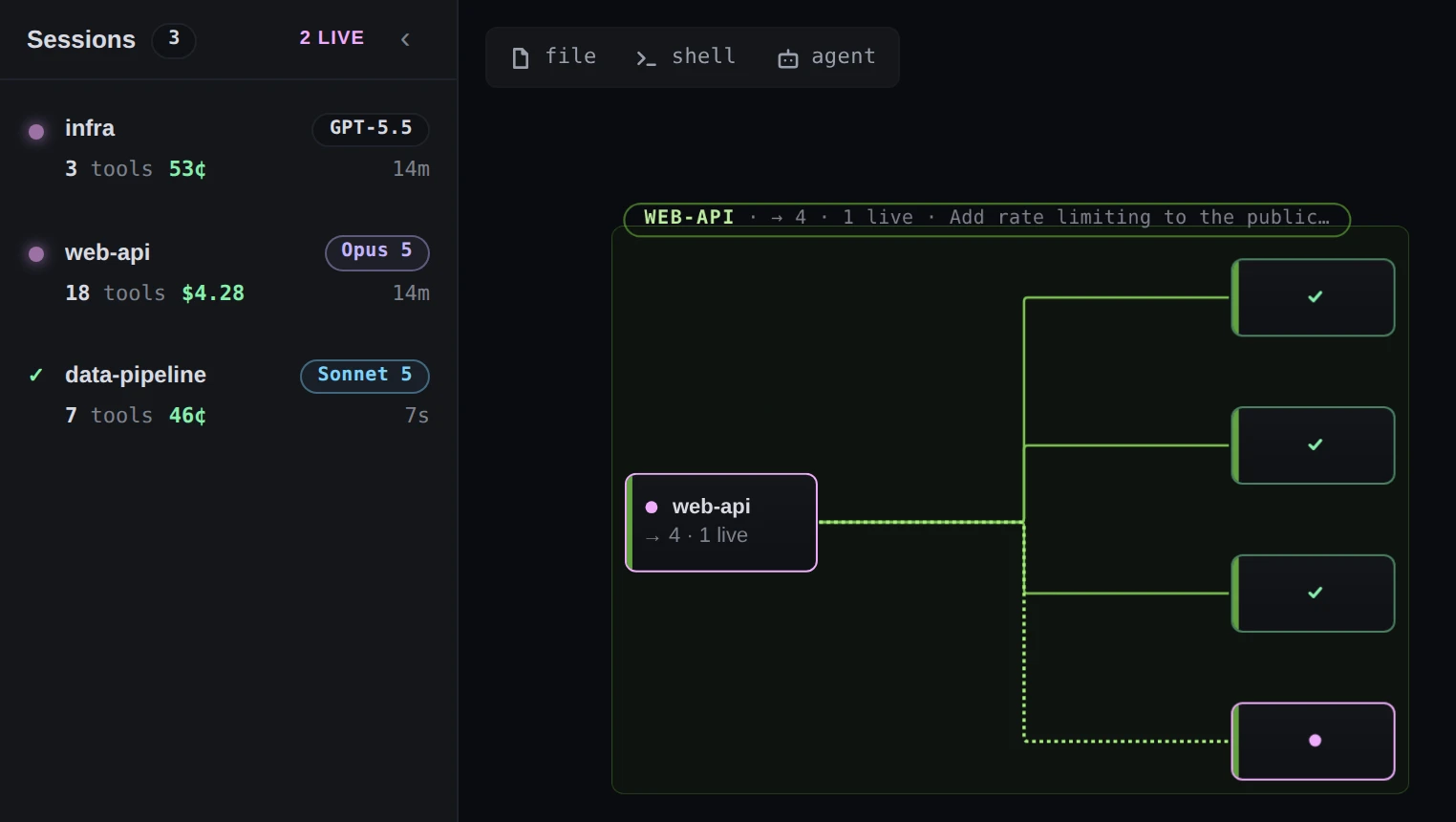
Press L, or click Session list in the topbar. In a window narrower than 1440 px the button shows only its list icon. The list has a row for every session on the canvas.
 Open the full-size picture
Demo data Two running sessions, then the finished one. A row's tool count includes its subagents' calls, which is why web-api reads 18 here and 7 on its card. Sessions waiting on you come first, longest wait first. Running sessions come next and finished ones last, the most recently active first. A row gives the state, the folder name, the model chip, the tool calls of the session and its subagents together, the session's spend, and how long it has run. For a session that is waiting on you, it gives how long it has waited instead.
Claude Code only. Only a Claude Code session can sort to the top as waiting on you. Codex sessions are never counted in the list's waiting figure, because Codex records no approval request the deck could read.
Click a row to frame that session and open its detail panel. ‹ or L closes the list; Esc does not.
-
Open one agent's detail panel
Double-click a card. From the keyboard, Tab to the card and press Enter. A single click only frames the session.
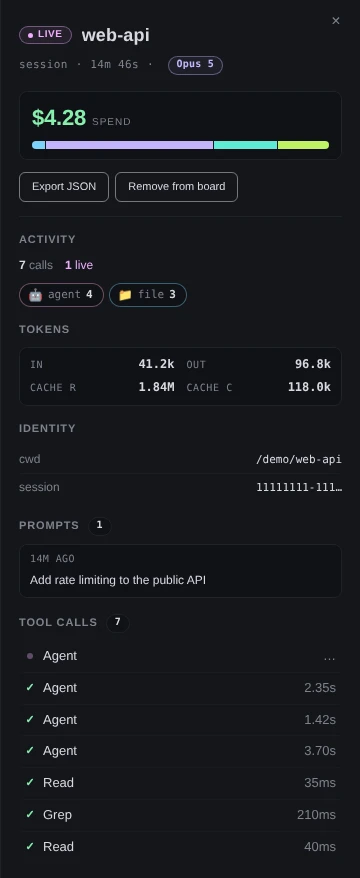
Demo data The panel for a session. Its newest tool call, the Agent call that started reviewer, is still running, so it shows … where the others show a duration. The top of the panel gives the agent's state and name, whether it is a session or a subagent, how long it has run, its model and the session's spend, with Export JSON and Remove from board. Then, in order:
- Activity: how many calls, how many are running or failed, and the calls by kind.
- Tokens: in, out, cache r (read) and cache c (created).
- Identity: the folder (cwd), the session id and, for a subagent, its parent.
- Prompts: what was typed into the session, newest first.
- Tool calls: each call, newest first, with how long it took.
Tokens and spend belong to the session. A Claude Code session's figures include its subagents, and a subagent's panel has no Tokens, no spend and no Prompts. Close the panel with × or D, or press Esc, which also deselects the card.
-
Open one tool call
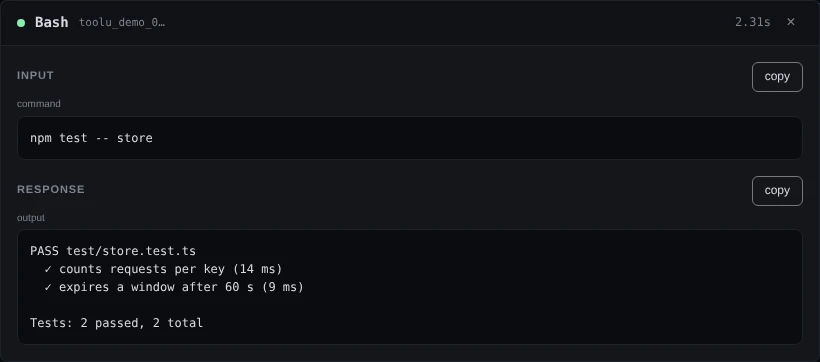
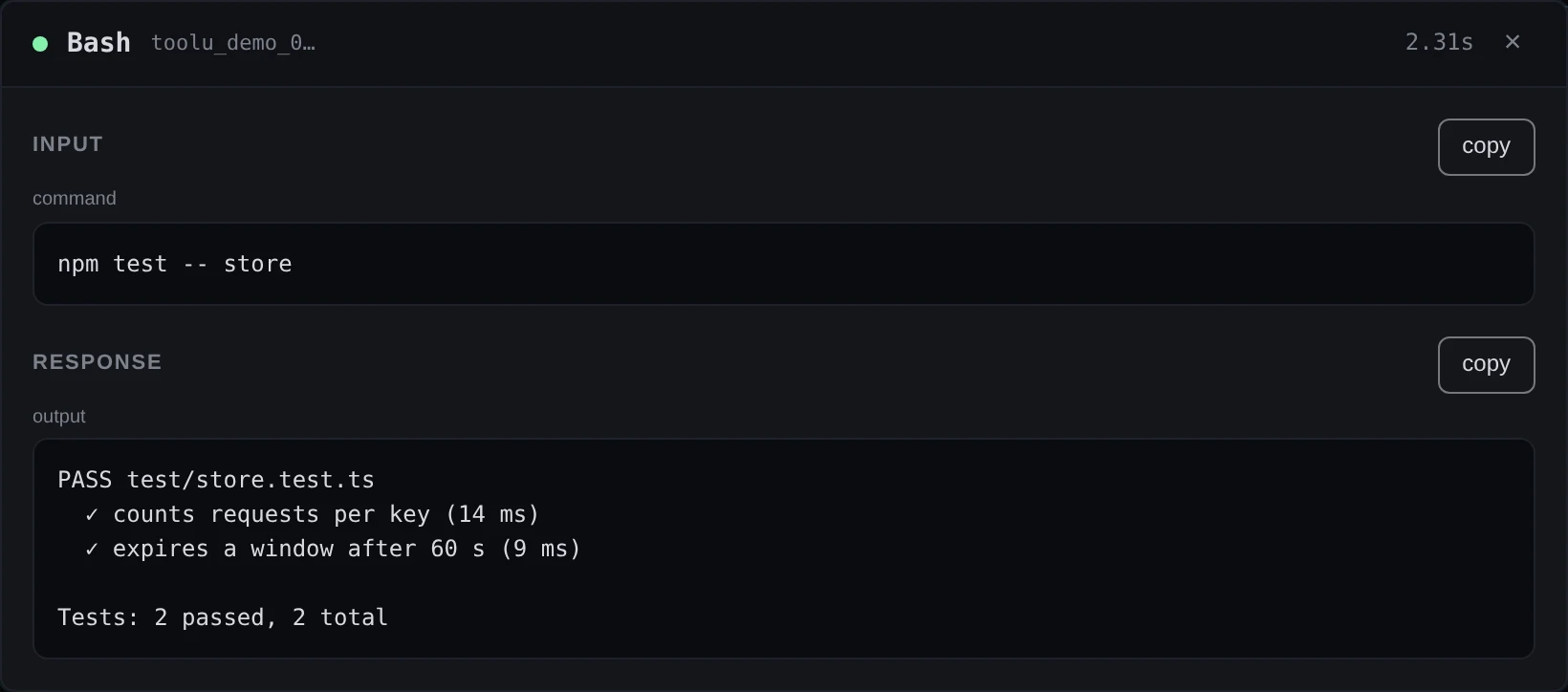
Click a row under Tool calls in the detail panel. A dialog opens with the tool's name and how long the call took, or in-flight… while it is still running. Under Input and Response it shows the call as it happened: the command and its output for Bash, the file and the change for Edit, the file for Read.
 Open the full-size picture
Demo data A finished Bash call from the migrator subagent. copy puts one side on the clipboard. A long block ends in show all, which opens it in full. With a mouse you can also click a bubble on the canvas to open the same dialog; the bubbles are not reachable from the keyboard, the Tool calls list is. Esc or × closes the dialog.
The panel keeps the last 200 calls of each agent, and the full input and response of the newest 25 only. For an older call the dialog says its full payloads were released, and shows a short preview.
-
Know what a restart brings back
The deck appends every event it captures to a log file and reads the newest part of it back when it starts. Stopping and starting the deck, a restart after an upgrade and a reboot all redraw the sessions that were there.
npx ccdeck --stopWhat comes back has limits. The deck replays at most the newest 2,000 hook events, and fewer when they are large. A deck with a workspace replays only what happened inside it. Nothing that happens while the deck is stopped is recorded. The board also keeps at most six finished sessions.
The log is
events.jsonlin~/Library/Logs/ccdeckon macOS, in%LOCALAPPDATA%\ccdeck\Logon Windows, and in$XDG_STATE_HOME/ccdeckon Linux, which is~/.local/state/ccdeckwhen that variable is not set.CCDECK_HOMEmoves it; withCLAUDE_CONFIG_DIRset it is inagent-daginside that directory.--statusnames each running deck's log.--historyuses a file of your choosing, and--no-persistwrites nothing and replays nothing.npx ccdeck --history ~/ccdeck-events.jsonlnpx ccdeck --no-persistClearing the canvas (C, or the bin in the canvas controls) asks first, in a dialog headed Clear the deck?, then empties the canvas and the log. A session whose start is older than what was replayed shows ? beside its name and ≥ before its clock: the deck joined it late, so the time is a floor. Positions you give cards by dragging them are kept by this browser, not by the log; R drops them.
If something goes wrong
The canvas says “Waiting for Claude Code or Codex” while a session is running
The deck was started with --scope or --workspace, and the session runs outside that folder. The message names the folder. On Linux, a difference in case alone makes it another folder. Start the session inside the named folder, or restart the deck without --workspace or --scope.
The terminal says “missing value --workspace — expected a path; using the default”
The value after --workspace was empty or looked like another flag, for example a shell variable that was not set. The deck started without a workspace and draws every session. Give it a real path, in quotes if it contains spaces.
Starting a scoped deck made the other deck disappear
Only one deck runs per Claude configuration directory, so a start with other settings replaces the running one. npx ccdeck --status shows which deck is running and what it draws. npx ccdeck with no flag goes back to a deck that draws every session.
Clicking a card does not open its details
Since ccdeck 3.25.0 a single click frames the card's session and closes the detail panel. Double-click the card, or Tab to it and press Enter. J, K, D and a session-list row open the panel too.
A letter key does nothing
A control you reached with the keyboard is keeping its keys, or a dialog is open. Press Esc first.
New sessions appear off screen
Auto-fit turned off when you panned, zoomed or clicked a card, and the canvas says Auto-fit off. Click Resume, or the crosshair in the canvas controls. F fits once without turning it back on.
After a restart a card shows ? beside its name and ≥ before its clock
The deck did not see that session start: it began before the part of the log that was replayed, or while the deck was stopped. Its first prompts and calls are missing, and its clock counts from when the deck first saw it. Nothing needs repairing.
A tool call's dialog says its full payloads were released
Only the newest 25 calls of each agent keep their full input and response. The preview in the dialog is what the deck still holds for that call.
Nothing came back after a restart
The deck ran with --no-persist, the canvas was cleared, or the deck was started with a different --history file. Start it without --no-persist and with the same --history as before; npx ccdeck --status names each running deck's log.
A finished session is gone from the canvas and the session list
The board keeps six finished sessions and lets an older one go two minutes after it finishes. That is different from Remove from board: a removed session keeps its row in the session list, and clicking the row brings it back.