Show only one project's sessions
A deck that draws only the sessions running in one folder or under it, how to see which folder that is, and the command that brings every session back.
Before you start
- Node.js 18 or newer.
- Claude Code, Codex, or both, and a session you can start in the project’s folder.
- A terminal open in that folder, or the folder’s path.
- Only one deck runs at a time, unless you run Claude Code with more than one
CLAUDE_CONFIG_DIR. A deck already running for every folder is stopped when the one for your folder starts. Step 7 brings it back.
Steps
-
Start the deck for one folder
In a terminal in the project’s folder, run:
npx ccdeck --scopeOr name the folder from any terminal:
npx ccdeck --workspace ~/code/web-apiThe deck then captures the sessions whose working folder is that folder or any folder under it.
~/code/web-api-v2is not under~/code/web-api. With both flags,--workspacewins.The path is resolved once, when the deck starts: a relative path is read against the folder you run the command in, and links are followed. A folder that does not exist yet is accepted. Put a path with a space in quotes; a
~inside the quotes is not expanded, so write"$HOME/code/web api". On macOS and Windows letter case is ignored. On Linux a folder whose name differs only in case is another folder. -
Read the terminal report
If a deck was already running with other settings, the first line says it was stopped:
stopped the deck on 4317 · pid … · it was started with different settings, orit was v…when that deck was an older version.The report’s first row is
workspace, followed by the folder as the deck resolved it: absolute, with links followed.(all)there means the deck watches every folder.The report still says
`ccdeck` brings this deck back. For a deck scoped to a folder that is not so: a plainnpx ccdeckreplaces it with one that watches every folder (step 7). To get back to this deck, run the command for the same folder again. It printsdeck already runningandno second deck was started, and opens the deck’s tab.To see the folder later, from any terminal:
npx ccdeck --statusUnder the deck’s address it prints the folder, or
(all), and the log file. A scoped deck is never markedopens this one, because a plain start would replace it. -
Look at the empty canvas
The start opens a new browser tab. It first replays the sessions its log already holds from that folder, and none from other folders. Until a session in the folder is drawn, the canvas says Waiting for Claude Code or Codex, and under it the folder the deck watches.
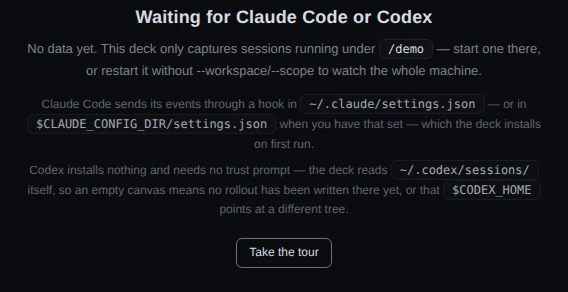
Demo data A deck started with --workspace /demo. Its log also holds a Claude Code session and a Codex session in/demo-notes, which is not under/demo, so neither is drawn.This is the only place the page names the folder. Once a session is drawn, the topbar, the session list and the cards look the same as on a deck that watches every folder.
A tab left open from the deck that was stopped reconnects by itself, but keeps what it had drawn, sessions from other folders included. Reload it, or close it and use the new tab.
-
Start a session in the folder
Run
claudeorcodexin the folder, or in any folder under it. The session appears on the canvas and in the session list as on any deck.Claude Code and Codex are filtered in different places. Claude Code: ccdeck’s hook still runs for every session on the machine, and sends each event only to a deck whose folder holds the session’s folder. For a session elsewhere it sends nothing. Codex: the deck reads the folder recorded at the top of each new rollout file, and does not read a file whose folder is outside its own.
Either way, a session outside the folder never reaches the deck. It is not drawn, not written to the event log, and plays no tone.
A session that was already running in the folder when the deck started appears the next time it does something, with ? beside its name and ≥ before its time, because the deck did not see it begin.
-
Know what the folder does not narrow
- The topbar’s this month and the Usage history dialog (H) come from ccusage, which covers sessions in every folder, including ones no deck watched.
- Accounts, quota windows and the machine panel are the same as on a deck that watches every folder.
- The Claude Code hook stays in
settings.jsonand runs for every session. - Clearing the canvas (C, or the bin in the canvas controls) asks first, in Clear the deck?. On a scoped deck that uses the default log it then empties the whole log file, including what was recorded earlier for other folders. The dialog calls it “this deck's event log” and does not mention other folders. To clear only this folder’s history, give the deck its own log (step 6).
The folder is fixed when the deck starts. Nothing in the page changes it: start the deck again with another folder.
-
Give the deck its own log, if you want one
npx ccdeck --scope --history ~/web-api-events.jsonl--historyand a file makes the deck read and write that file in place of the default log, and the report’slogrow names it. Clearing then empties only that file. While this deck runs, the folder’s sessions are not written to the default log, so a deck that later watches every folder does not replay them.--no-persistkeeps no log at all.The log file is part of what a start compares, and so is a port asked for with
--port. A start with another file or port than the running deck’s stops that deck too: it still does not run beside it. To get back to this deck later, run the whole command again,--historyincluded. -
Go back to every session
Run the deck with no folder flag:
npx ccdeckIt stops the scoped deck, with the same
stopped the deck on …line, and starts one whoseworkspacerow reads(all).npx ccdeck --statusnow marks itopens this one.--allis accepted and changes nothing: it is what a plain start already does.The new deck replays the default log, up to its newest 2,000 hook events. Sessions that ran outside the folder while only the scoped deck was up were never recorded, and do not come back. Ones still running appear the next time they do something, marked ? and ≥. Read a session on the canvas says what a restart brings back.
A deck that starts when you log in (see Start ccdeck for the first time) always watches every folder.
If something goes wrong
The canvas stays empty and names a folder
The session runs outside that folder. A sibling such as ~/code/web-api-v2 is outside ~/code/web-api, and on Linux so is a folder whose name differs only in case. Start the session inside the named folder, or run npx ccdeck to watch every folder.
The report says missing value --workspace, and the workspace row reads (all)
The value after --workspace was empty or looked like another flag, for example a shell variable that was not set. The deck started for every folder. Start it again with a real path.
The report says unknown option, and the workspace row shows part of the path
A path with a space was not quoted, so the shell split it. Start again with the path in quotes. The new start replaces the deck scoped to the wrong folder.
The deck for every folder is gone
The start for one folder stopped it, and said so with it was started with different settings. Run npx ccdeck when you want it back.
An open tab still shows sessions from other folders
The tab reconnected to the new deck and kept what it had drawn. Reload it.
An open tab says Lost connection to the ccdeck server. Reconnecting…
The new deck runs on another port: --port asked for one, or 4317 was held. npx ccdeck --status prints the address. Close the old tab.
Sessions from other folders are missing after going back to every session
They ran while only the scoped deck was up, so no deck recorded them. Nothing brings them back. Ones still running appear when they next do something.
After a reboot the deck watches every folder again
The deck that starts at login is always started without a folder. Run the command from step 1 again.
The report says could not stop the deck on 4317
The running deck did not stop in time, and the new deck may have taken a port between 4318 and 4400 beside it. Run npx ccdeck --stop, which stops every deck, then start the scoped deck again.