
Count the skills Claude Code and Codex use
To see which skills Claude Code and Codex use, open Skill activity from the stripe on the right in ccdeck: it ranks the skills your agents loaded on this device, whether you typed its slash command or the agent called it.
You will
- See which skills your agents used, and how often
- Tell the commands you typed from the skills the agent called
- Find where and when one skill ran
- Count, or stop counting, the slash commands you type
Before you start
- ccdeck 3.47.0 or later, running in your browser or the desktop app:
npx ccdeck. Counting starts the first time 3.44.0 or later runs; older sessions are not added. - To count the slash commands you type: Claude Code 2.1.116 or newer, every copy of it on this device. Step 4 says why.
Steps
-
Open Skill activity
Click the Skill activity icon on the stripe on the right, below Tool activity. It has no key. On a phone, click More in the dock along the bottom, then Skill activity.
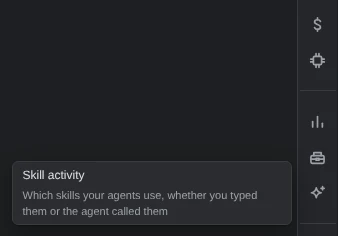
Demo data Hover an icon to see its name. It opens as a dialog over the deck, and does not update by itself: the refresh icon at its top right reads the history again.
-
Read who starts your skills
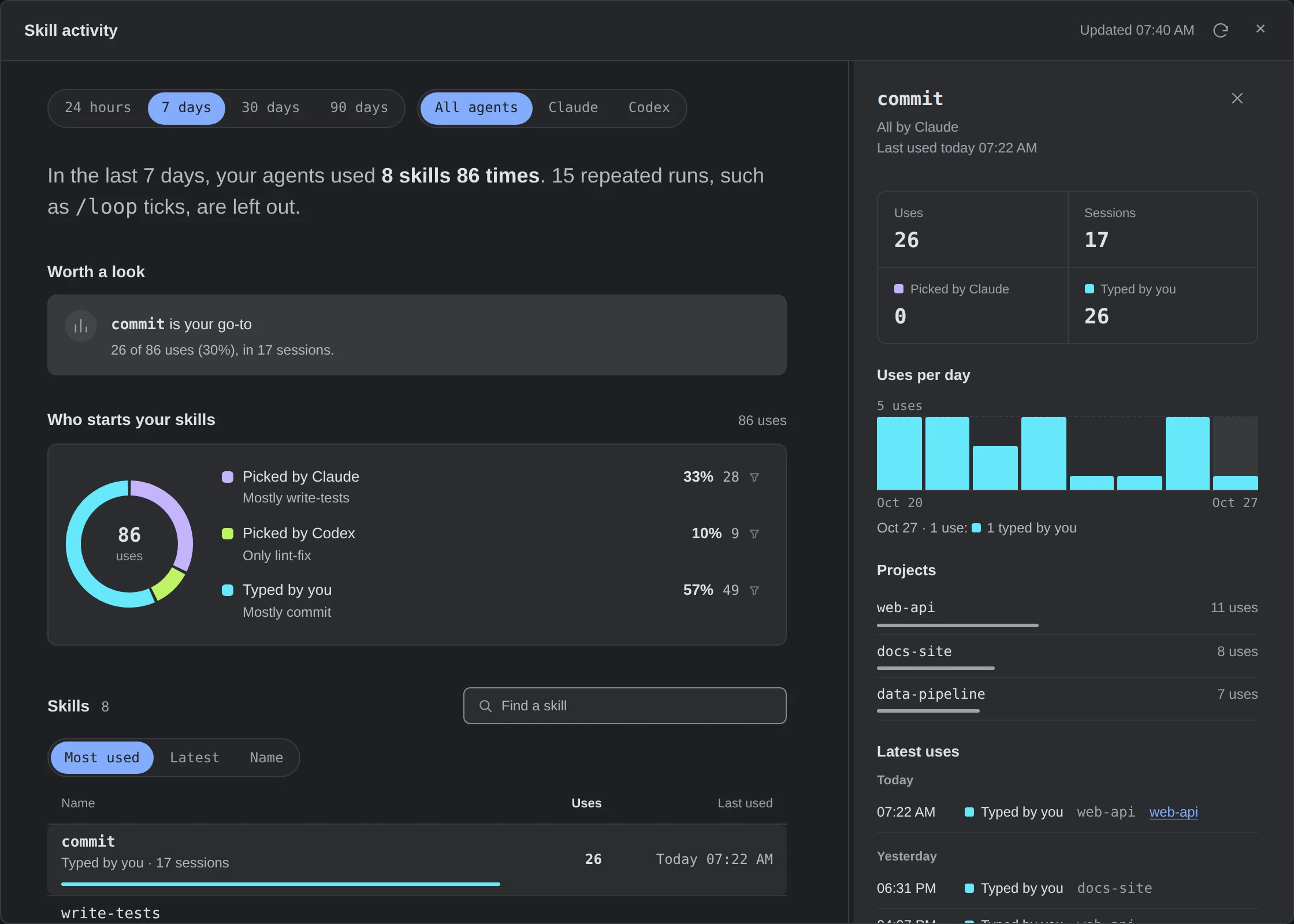
The dialog opens on the last 7 days of all your agents. Who starts your skills splits the uses between Picked by Claude, Picked by Codex and Typed by you; click a part to list only those skills. Worth a look names up to three skills, such as the one you lean on most.
Each row is a skill, with who started it, its sessions, its uses and when it last ran. A plugin’s skill starts with the plugin’s name, as in
docs:changelog.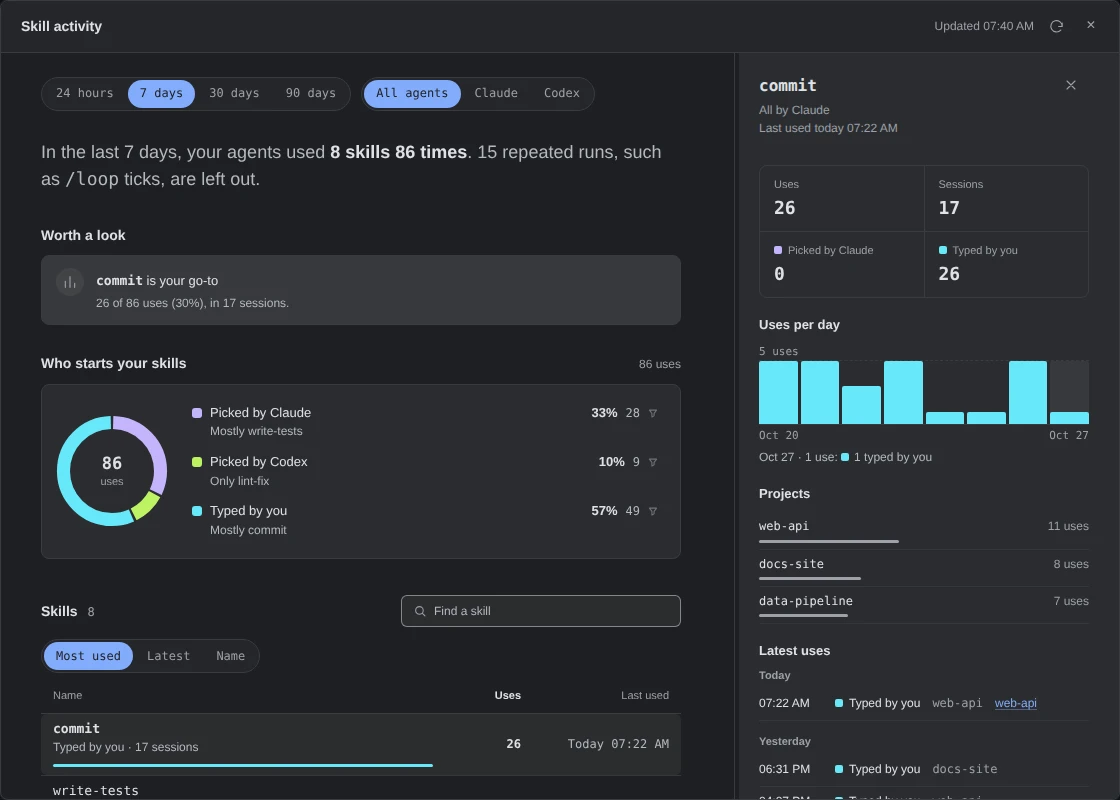 Open the full-size picture
Demo data A week of skills on a few projects: commitis typed by hand,write-testsmostly picked by Claude.The buttons at the top change the period and the agents; those above the list sort it. Type into Find a skill to filter it. The list shows twelve rows; Show all shows the rest.
More about what counts as a use
- A use is a skill loaded into an agent: Claude calling its Skill tool, a slash command you type in Claude Code, or a skill you pick in Codex with
$or/skills. Custom commands count as skills. - When Codex picks a skill itself, it reads the skill’s
SKILL.mdor runs one of its scripts. That counts once a turn, only for a skill Codex listed for the session, and shows as Picked by Codex. - The same command typed again in one session with the same arguments, such as a
/looptick, is a repeat. Repeats stay out of the uses; the row counts them. - Built-in commands such as
/clearor/model, MCP prompts and a skill’s name inside a message are not uses. A skill that never ran is not listed. - How this is counted, at the foot of the dialog, says the same, but calls Codex’s own pick “detected”.
- A use is a skill loaded into an agent: Claude calling its Skill tool, a slash command you type in Claude Code, or a skill you pick in Codex with
-
Open one skill’s details
The first skill’s details open with the dialog, and stay open when you change the period. Click another row to read its own: its uses and sessions, how often an agent picked it and you typed it, Uses per day by who started them, the projects it ran in most, and its Latest uses.
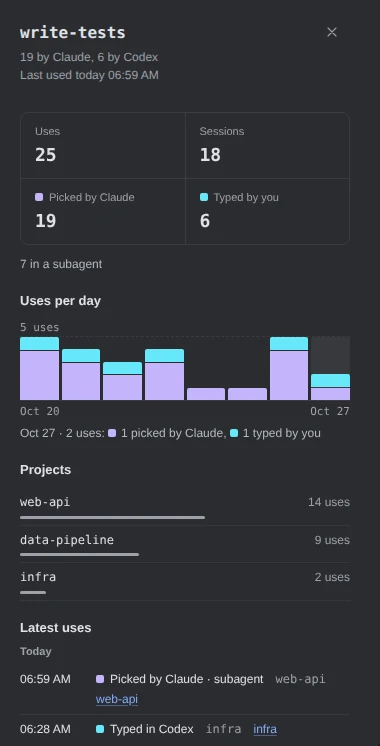
Demo data Claude picks write-testson its own; in Codex it is typed by hand.A use whose session is still on the canvas names it: click the name to close the dialog and show that session.
More about what is stored
- For each use: the skill’s name, Claude or Codex, how it started, when, the session and the project folder’s name. Never its arguments, paths, prompts or output.
- Uses are kept with Tool activity’s history, on this device only. Settings › Data › Tool history sets how long, 90 days by default, and clears both; see See which tools Claude Code and Codex use most.
npx ccdeck --uninstall, with or without--purge, leaves this history on disk.
-
Check that the slash commands you type are counted
A slash command you type reaches ccdeck only through Claude Code’s
UserPromptExpansionhook. When every Claude Code on this device is 2.1.116 or newer, ccdeck adds that hook to Claude Code’ssettings.jsonas it starts, beside its other hooks. The first time, it keeps a copy of the file as it was,settings.before-skill-hook.json, in~/.claude/agent-dag.Older Claude Code anywhere leaves it out. Claude Code before 2.1.101 ignores a whole
settings.jsonthat names a hook it does not know. So one copy older than 2.1.116, or one that does not say its version, keeps the hook out, and the dialog says typed commands are not counted.To count only the skills the agents call, stop ccdeck with
npx ccdeck --stopand start it again withAGENTS_DECK_SKILL_HOOK=0, as inAGENTS_DECK_SKILL_HOOK=0 npx ccdeck. That start takes the hook back out.More about the hook and its copy
- ccdeck decides again at every start. A deck started without the variable, at login for one, adds the hook back once every Claude Code is new enough; one rolled back below 2.1.116 has it taken out.
- Any value but
1turns it off:0,falseor a typo. Your ownUserPromptExpansionhooks are never touched. - With
CLAUDE_CONFIG_DIRset,settings.jsonand the copy are in that folder instead of~/.claude. - The copy can hold whatever
settings.jsonheld, API keys included, so on macOS and Linux only you can read it.--uninstallremoves the hook and leaves the copy. - Codex needs no hook: ccdeck reads its skills from its session files.
If something goes wrong
“Slash commands you type are not counted yet”
A Claude Code on this device is older than 2.1.116, or does not say its version. Update every copy, then stop ccdeck with npx ccdeck --stop and start it again. The Skill hook line in the terminal where it started names the versions it found, or what else kept the hook out.
“Slash commands you type are not counted: the deck was started with AGENTS_DECK_SKILL_HOOK turned off”
Stop ccdeck with npx ccdeck --stop, then start it again without that variable.
“No skills used in the last 7 days”
Counting starts the first time ccdeck 3.44.0 or later runs, and Claude Code’s uses reach it only while ccdeck is running. Use a skill, then click the refresh icon. Check that All agents is on.
A skill you used is not in the list
Built-in commands, MCP prompts and repeats with the same arguments are not counted, nor a skill Codex reads on its own without listing it for the session. Typed commands also need step 4’s hook.
“Some uses could not be saved or read”
ccdeck could not save or read part of the history, so the numbers may be a little low. Check the free space on the disk that holds ccdeck’s data folder.
Something else? See Troubleshoot ccdeck: status, logs, port and hooks.