
Change ccdeck's language
To change ccdeck's language, open Settings with ⌘, or Ctrl+, and pick one under General › Language: the deck's own words change at once, and what Claude Code and Codex write stays as they wrote it.
You will
- Show the deck in your language
- Know what stays as it was written
- Go back to English or to your browser’s language
Before you start
- ccdeck 3.52.0 or newer, running. The version is beside the name at the left of the topbar.
Steps
-
Open Settings › General
Click Settings at the right of the topbar, or press ⌘ + , (Ctrl + , on Windows and Linux). Settings opens where you last left it: if that is not General, click General at the top of its list.
Language is the first group on the page.
More about finding it
Search in the topbar (⌘ + K, or Ctrl + K) finds it too: type
languageand click Interface language, which opens Settings on that row. The English word works whatever language the deck shows, and so does the word in the language on show. The Search settings field at the top of Settings finds it the same way. -
Click your language
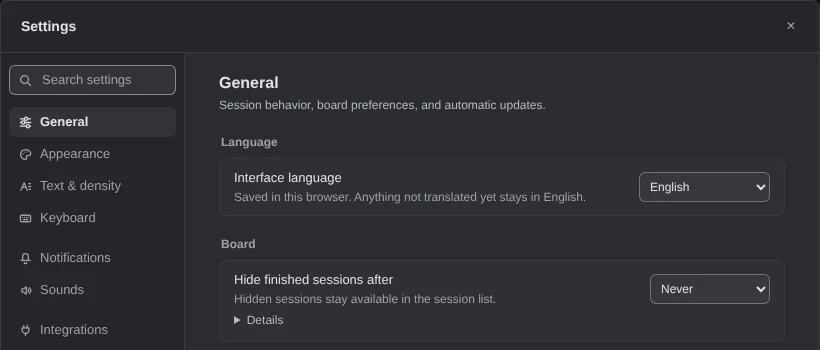
Click the Interface language list, then click your language. Each one is listed under its own name, so you can find yours whatever language the deck is in.
 Open the full-size picture
Demo data Until you pick one, the list shows the language the deck took from your browser. The list holds English, 繁體中文 (Traditional Chinese), 简体中文 (Simplified Chinese), Deutsch, 日本語, 한국어, Français, Español, Português (Brasil) and Română.
-
Read the deck in the new language
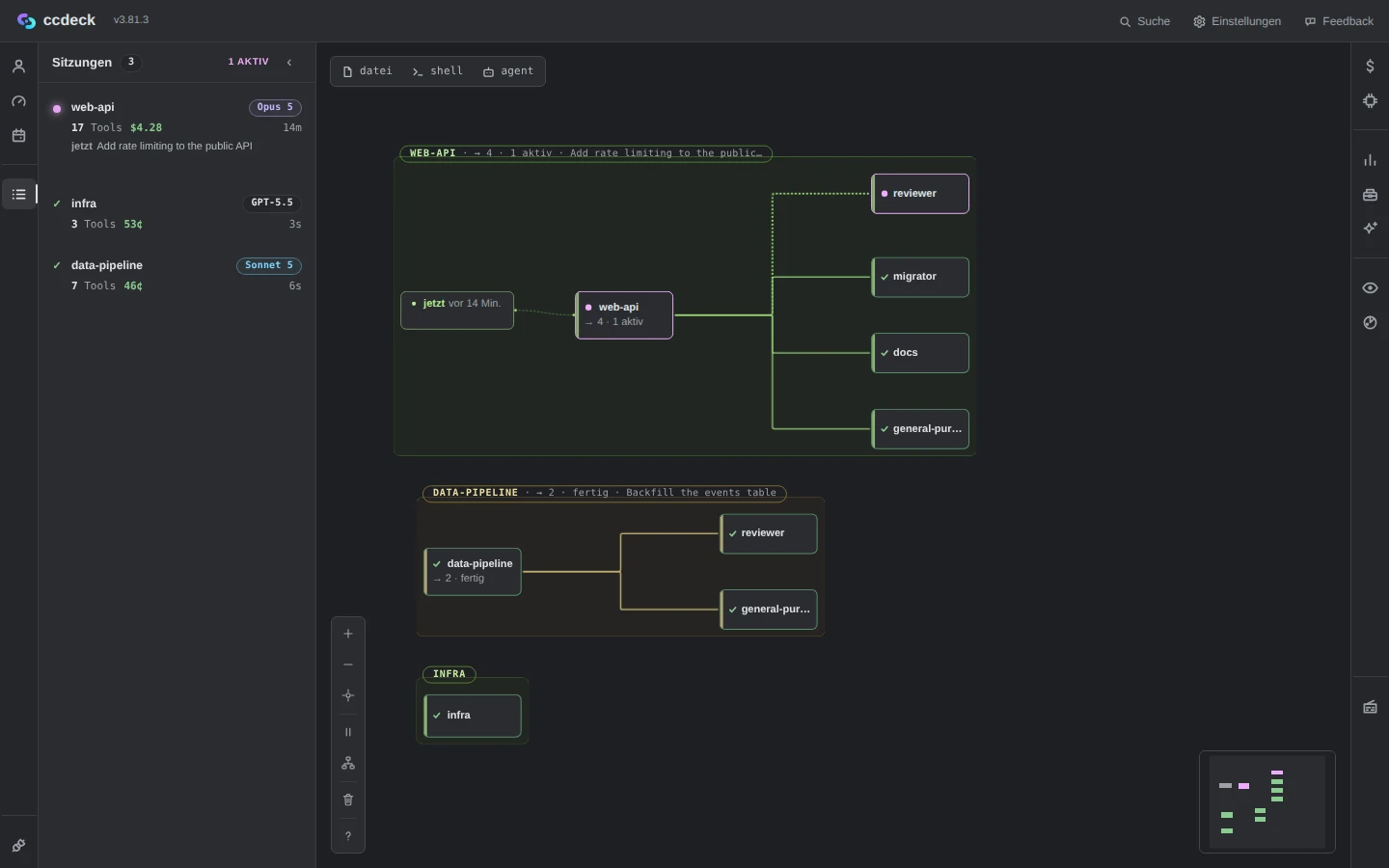
The deck’s own words change at once, with no reload: the topbar, the panels, Settings and the labels on the canvas. Another tab of the deck follows.
 Open the full-size picture
Demo data The deck’s words in German; the prompts and the names stay as the sessions wrote them. The choice of Deutsch was supplied to the page for this picture. What Claude Code and Codex write stays as they wrote it: prompts, replies, tool calls, file names and the names of sessions and subagents. What’s new, and the text of Jira, GitHub and GitLab issues, stay as written too. A word not translated yet shows in English.
The terminal stays in English. What
ccdeckprints, andccdeck tui, are not translated. -
Go back to English or to your browser’s language
For English, click English at the top of the same list.
The list has no entry that follows your browser. Once you pick a language, the deck keeps it in this browser, even after your browser’s language changes.
More about following your browser again
Remove the saved choice. In your browser’s developer tools, open the deck tab’s local storage for its address, such as
http://127.0.0.1:4317, deleteagent-dag.languageand reload. Clearing that address’s site data does the same, but also forgets the deck’s other settings kept in this browser, such as the theme and the canvas layout.With no saved choice, the deck takes the first language in your browser’s list that it has.
de-ATgives Deutsch andpt-PTPortuguês (Brasil); Chinese from Taiwan, Hong Kong or Macau gives 繁體中文, other Chinese 简体中文. With none of them, English.
If something goes wrong
The deck is in a language you cannot read
Press ⌘ + , (Ctrl + , on Windows and Linux) and click the first section in the list on the left. The first list on that page is the language, with English at its top.
The deck opened in a language you did not pick
Until you pick one, the deck follows your browser’s language. Click yours in Settings › General › Language.
Another browser or the desktop app shows another language
The choice is saved in each browser, and the desktop app’s window keeps its own. Pick the language there too.
Some words are still in English
They are not translated yet, and show in English until a release translates them.
Something else? See Troubleshoot ccdeck: status, logs, port and hooks.