
Claude Code and Codex in a terminal pane
Click a session's card on the Board and the deck switches to Workspace, with that session in a terminal pane and the keys in it.
You will
- Open a Claude Code or Codex session in a terminal pane and type into it
- Start a new session in a project
- Read the conversation and reply in Chat
Before you start
- ccdeck 4.0.0 or later. The terminal is on unless you turned it off (step 6).
- On Linux and macOS, tmux 3.2 or later, which runs each session. Windows needs no tmux.
- The terminal runs on ccdeck's terminal engine, which comes with ccdeck (npm installs the one for this machine, the desktop app carries it) and is checked before every start.
Steps
-
Click a session's card
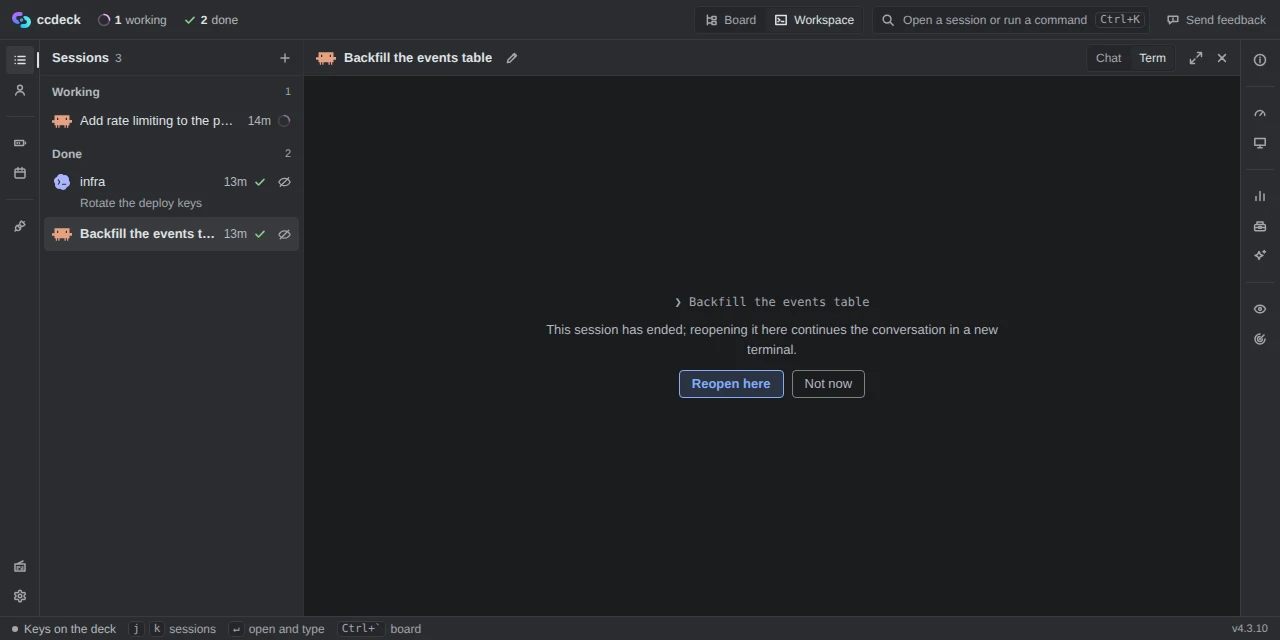
On the Board, click a card. The deck switches to Workspace, with the session and the keys in a pane: what you type goes to the session, Esc included.
Ctrl + Shift + X (⌃⇧X on a Mac) gives the keys back to the deck. ✕ empties the pane; the session keeps running. For a pane beside the board, click ⋯ in the canvas controls, then Open the Command Panel. To open several sessions at once, see Claude Code and Codex sessions side by side.
 Open the full-size picture
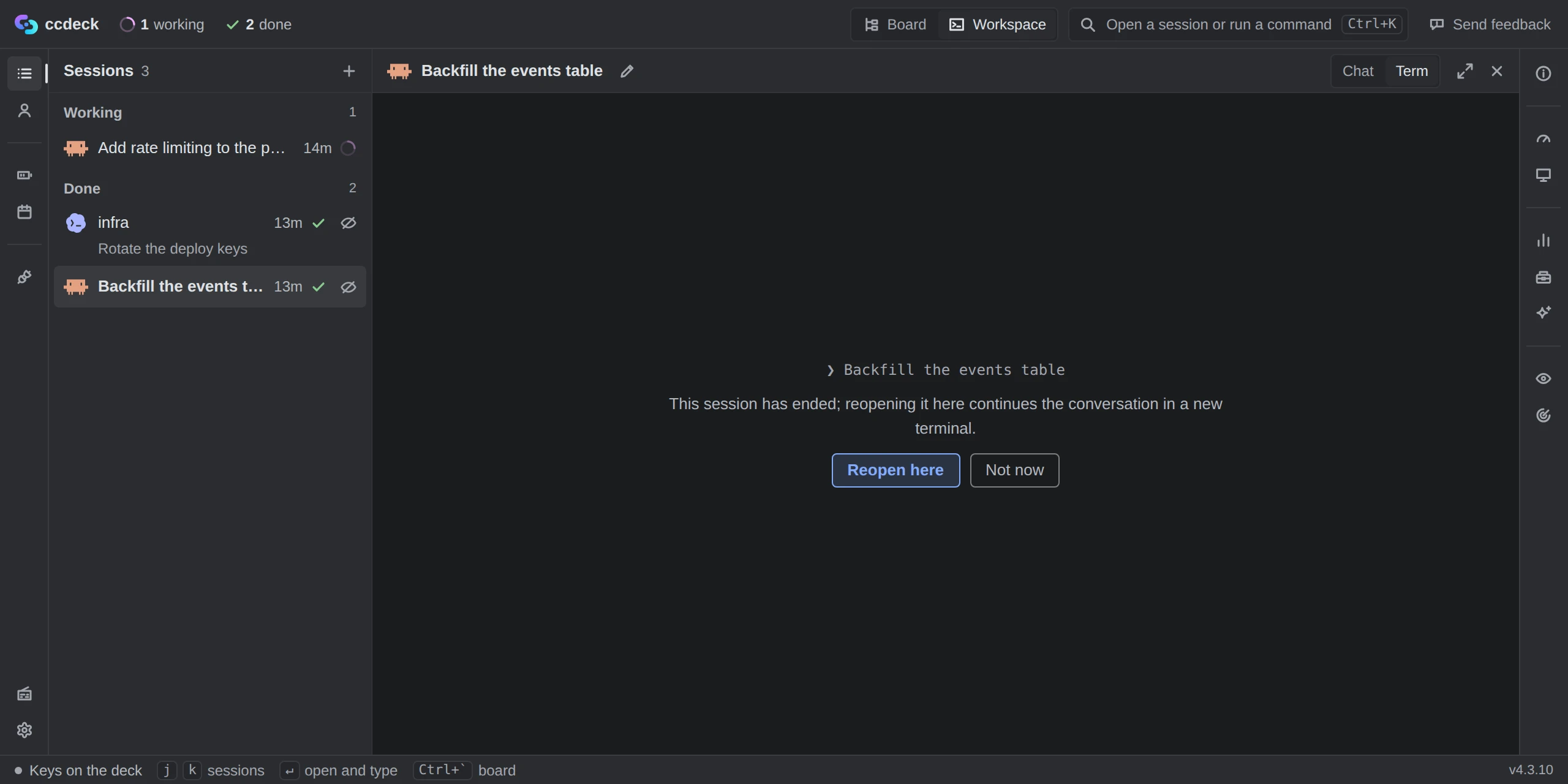
Demo data This session has ended, so its pane offers Reopen here. That this session can be reopened here was supplied to the page for this picture. -
End a session, or reopen one
Type
/exitor press Ctrl + D in the session: its pane closes and the session stays in the Sessions list. Click it again later and its pane offers Reopen here, which continues the same conversation in a new terminal.If the agent crashes or is killed, the pane keeps its last frame, with Reopen here. A session running in a terminal outside ccdeck says so in its pane; once you quit it there, the pane offers Reopen here.
More about reopening
- On a pane’s last frame, Reopen here sits beside “ended” at the top, in each split pane.
- While it works it reads Reopening…. If the agent cannot resume the conversation, the pane offers Try again or Start new session here. A refused reopen says “Could not reopen this session.”
- If another Claude Code or Codex still has the conversation open, the pane names it, and offers Reopen here once it lets go.
- On macOS and Linux, a Codex pane that ended reopens in place. After Codex's own Update now, ccdeck starts it again in the same pane.
- A project folder that was moved or deleted is named, with Check again and Choose folder…, which starts a new session elsewhere.
- On a Mac, a Claude session open in Ghostty offers Move session here, with Ghostty 1.4 or later. When a move cannot be done, the pane says why.
-
Start a new session
In Workspace, click the + at the top of the Sessions list, or New session in an empty pane. On the Board, with the panel open, the + above the tiles does the same.
The one field lists your recent projects. Type to search them, or type a folder's full path. Click Claude or Codex, then the button that names both. ccdeck checks the folder first, and says so here if the agent cannot open it.
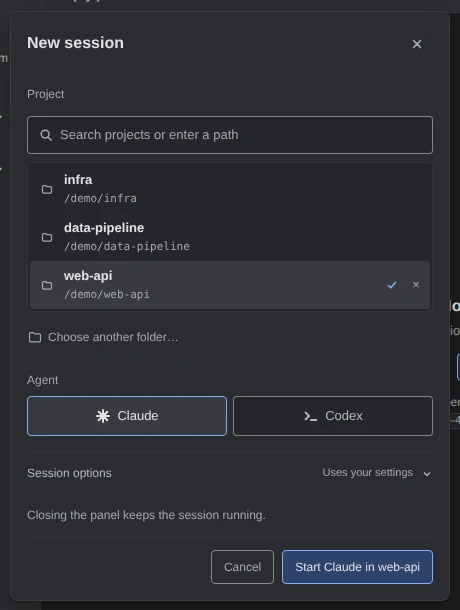
Demo data The start button says which agent starts, and where. More about New session
↑ and ↓ move through the projects, Enter picks one, and Ctrl + Enter starts. Shift + Delete takes a project off the list; its folder stays.
For Claude Code, Session options sets the model, how it asks for permission, and whether it works in a new git worktree. Each starts at your own settings. Codex starts as it is.
-
Read and reply in Chat
In Workspace, a Claude Code or Codex session's pane has Chat and Term in its header. It opens on Term, the terminal. Click Chat to read the conversation: your prompts, the replies, and the steps between them.
Write in the box at the bottom and press Enter, or click Send. The message goes through the session's terminal, so the session must be open in the pane.
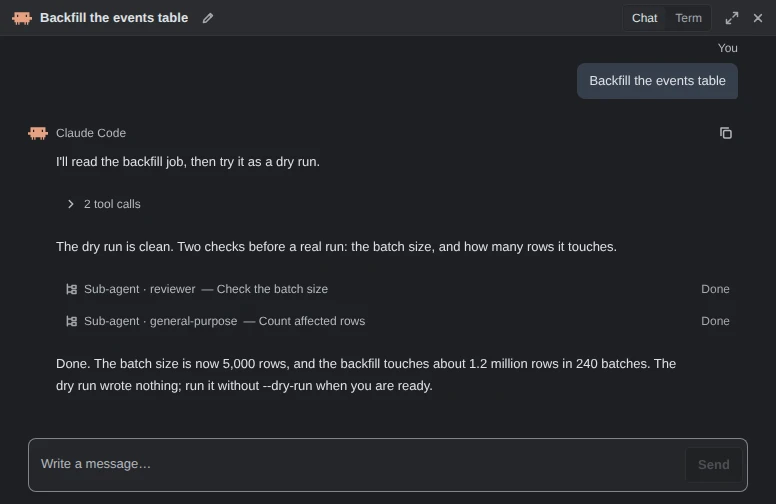
Demo data Chat shows the conversation; Term goes back to the terminal. Workspace only. The Command Panel shows the terminal alone.
More about Chat
- Between messages, Chat shows the steps: the checklist, file edits as the lines they changed, sub-agents, and steps that failed or that you declined. A Codex session's commands, edits, plan and web searches show the same way.
- After you send, a line reads Sending…, then what the agent is doing. If the agent has not taken the message, Chat offers Show Term.
- Claude Code only: a question shows as a card with its options and Send answer, and a command, edit or plan to approve shows its choices. Choices that change the session's rules, such as “don't ask again”, open in Term.
- Claude Code only: Stop interrupts it, as Esc does in Term.
-
Change the text size
Click the text size button in the pane's header, “Text size · 100%” on hover, then + or −; Back to 100% resets it. While you type in the pane, Ctrl + = makes the text larger, Ctrl + - smaller, and Ctrl + 0 resets it. On a Mac, use ⌘ instead of Ctrl.
The size runs from 67% to 200%. This browser keeps it, for every pane.
-
Turn the terminal off
Open Settings at the foot of the stripe on the left, then General. Under Experimental, the Command Panel switch turns off the Command Panel and Workspace. Your sessions keep running, and come back when you turn it on.
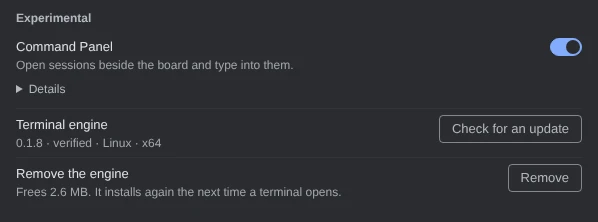
Demo data The engine this deck runs, verified before it started. More about the engine
Terminal engine shows the engine's version and that it passed its check. Remove the engine frees its space; it installs again the next time a terminal opens.
If something goes wrong
The pane says “tmux · not found on this machine”
On Linux and macOS each session runs in tmux. Install tmux 3.2 or later with the command the pane shows, such as sudo apt install tmux, then click Check again. “Older than 3.2” means: update it.
The pane says “The terminal needs its engine”
The engine for this machine is not installed. Click Install the engine, which fetches that one package from npm and checks it before it runs, or Install from a file… to pick the package yourself.
The pane says “No terminal engine for” your platform
The terminal works on macOS (Intel and Apple silicon), Linux (x64 and ARM64) and Windows x64. Elsewhere, Windows on ARM included, the rest of ccdeck works without a terminal.
There is no Workspace in the topbar
Workspace needs the Command Panel switch on (step 6) and a window wider than a phone's.
The pane says Claude Code or Codex is not installed
Click Install Claude Code or Install Codex there. If that fails, it says why and shows the command.
Something else? See Troubleshoot ccdeck: status, logs, port and hooks.