
Use your main Claude Code account first
To keep Claude Code on your main account, click Set as home in that account's ⋯ menu in ccdeck's Claude accounts panel, then turn on auto-switch: it moves you there, and comes back after home's 5-hour window resets.
You will
- Mark the account auto-switch comes back to
- Use up weekly quota before it resets
- See why auto-switch passes an account over
Before you start
- Two or more Claude accounts in the Claude accounts panel. Switch between multiple Claude Code accounts adds them.
- ccdeck 3.46.0 or newer. Update ccdeck to the latest version says how.
Steps
-
Click Set as home in your main account's menu
Press A, or click the Claude accounts icon at the top of the stripe on the left. Click ⋯ on the account you want to use most, then click Set as home.
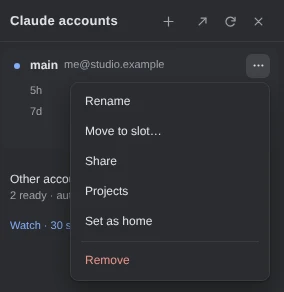
Demo data One account is home, on this machine. The same item reads Remove home once it is set. Auto-switch can be off. You can set everything in this guide first and turn it on in step 4; until then, home does nothing.
More about the home account
- Auto-switch does not move you off home before the threshold. When home reaches it, auto-switch moves to another account.
- It comes back once home's 5-hour window has reset, and at least 30 minutes after its last move, so the two accounts do not take turns.
- Home is kept by its e-mail address, not its slot, so reordering accounts does not change it.
- Auto-switch moves only to an account read in the last 15 minutes. When home's reading is older, it asks claude-swap to read home once more before moving anywhere else.
-
Hover the house icon to see what auto-switch does with home
A house icon marks the home account's row. Hover over it, or focus it, for a hint. With auto-switch on, it says “Home · Auto-switch comes back here after its 5-hour window resets”, or why home is paused: held out of rotation, or waiting for you to sign in again.
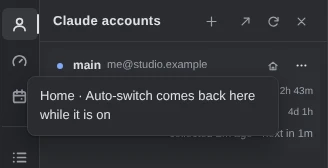
Demo data Auto-switch is still off, so the hint says home counts only while it is on. A paused home keeps its icon. -
Use up weekly quota that resets soon
Click Other accounts. Under Auto-switch, click the list beside Next account, click Soonest weekly reset, and click save. Auto-switch then moves to the account whose 7-day window resets soonest, within 4 days, so quota that is about to reset is used before it is lost.
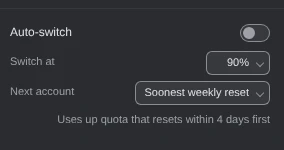
Demo data Most room left, the default, is claude-swap's own pick. More about Soonest weekly reset
- It also moves before the threshold, to an account whose week resets at least an hour sooner than the one in use, and not within 30 minutes of the last move.
- When no account resets within 4 days, claude-swap picks the account with the most room, as before.
- Home comes first when usable. The weekly rule applies when leaving home, when home is unavailable, or when none is set.
- The 4 days are 95 hours, and are not a setting.
-
Turn on auto-switch
Click the switch beside Auto-switch. If Claude Code is on another account, auto-switch moves it home on its next check, once home has room. It leaves home when home passes the percentage beside Switch at.
Auto-switch starts from the account Claude Code is signed in to. After a
/loginin Claude Code, the panel, Switch, auto-switch and Usage all follow that account.
If something goes wrong
There is no Set as home in the ⋯ menu
Update ccdeck to 3.46.0 or newer: before it, the item showed only while auto-switch was on. If the menu reads Remove home, that account is home already. An account listed without an e-mail address cannot be home.
Auto-switch does not move to home, or to the soonest reset
Check that the switch beside Auto-switch is on, and that the panel does not say a cswap auto loop in your terminal is doing the switching: that loop knows neither rule. Auto-switch moves only to an account that is in rotation, signed in and more than five percentage points under the threshold, so put a held-out account back in rotation, or sign in again.
You switched accounts yourself, and auto-switch left you there
That is on purpose: an account you pick, with Switch or a /login in Claude Code, stays until it reaches the threshold. To hand the choice back, turn auto-switch off and on again.
“Claude Code is signed in to …, which isn't in your accounts.”
Claude Code is on a login claude-swap does not hold, so no account in the panel is the active one. Click Add account on that line and sign in as that account; the deck can then switch to it and back.
Something else? See Troubleshoot ccdeck: status, logs, port and hooks.